


Running multiple online stores can be quite challenging. Each store requires attention, from managing products and processing orders to handling customer inquiries and updates. However, with WooCommerce multisite, this process will be simplified and one can focus more on growing their e-commerce presence.
How does WooCommerce Multisite work?;
WooCommerce Multisite is a powerful feature that allows you to manage multiple online stores from a single WordPress installation. Essentially, it allows you to create a network of stores that share resources while maintaining separate storefronts, products, and customer bases. Kind of like a shopping mall versus individual stores.
Each store in the multi-site network operates independently. This means that the design, product catalog, payment gateways, and shipping options can be customized for each store. However, the real advantage lies in the centralized management. Basic updates, plugin installations, and even user roles are managed from one central dashboard. This simplifies administration and saves valuable time compared to managing separate WordPress installations for each store.
The magic of WooCommerce multisite happens thanks to WordPress« multisite functionality. When enabled, it allows your WordPress installation to host multiple »sites,” or in this case, stores. These stores use the same core WordPress files and plugins (like WooCommerce), ensuring consistency and easier management. While they can share resources, each site can also have its own unique themes and plugins, allowing for a high level of customization to meet specific brand requirements.
How is a WooCommerce Multisite created?;
Step 1. Back up your current WordPress installation
- From your WordPress admin dashboard, Tools > Export. Then, export items from the table.
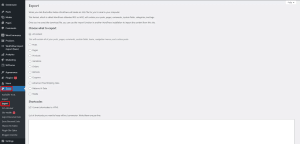

- After that, click the "Download export file" button and wait for the data to be downloaded.
- Save the file to your computer.
Step 2. Enabling multisite in the WordPress file
Αφού δημιουργηθούν αντίγραφα ασφαλείας του αρχείου, άνοιγμα του αρχείου “wp-config.php” και προσθήκη της ακόλουθης γραμμής”
/* Multisite */
define( ‘WP_ALLOW_MULTISITE’, true );
This will enable the multi-site network setup menu in your WordPress admin dashboard.
Step 3. Create a multi-site WordPress network
- In your WordPress admin dashboard, go to «Tools» > «Network Setup».
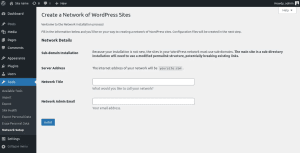

- Choose between sub-domains and sub-categories based on needs.
- Fill in the necessary details for the network, including the server address, network title, and administrator email.
- After filling everything correctly, click the "Install" button.
- Τέλος, τήρηση των οδηγιών που εμφανίζονται στην οθόνη μετά την εγκατάσταση του δικτύου για να προστεθούν συγκεκριμένες γραμμές στα “wp-config.php” και “.htaccess αρχεία”.
Step 4. Installing WooCommerce
- Μετάβαση “Οι ιστότοποί μου” > “Διαχειριστής δικτύου” > “Προσθήκες” > “Προσθήκη νέου”.
- Select WooCommerce in the search bar. Then click "Install Now" and enable WooCommerce on your sites.
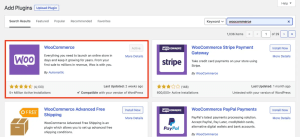

- If someone wants to add new WooCommerce stores, go to «Sites» > «All Sites» > «Add New.» Enter all the relevant details, such as site name, URL, and admin email address.
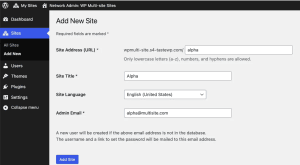

- From now on, one can configure their individual stores in the WooCommerce multi-site network from a single dashboard.
Step 5. Manage user roles and permissions across the network
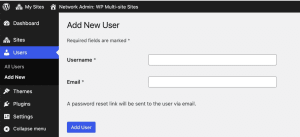
- If anyone wants to add users and assign their roles so they can access all sites, go to My Sites > Network Admin > Control Panel > Users > All Users.
- Fill in the required fields (Username and email) and click on the "Add user" button.
Why is WooCommerce Multisite beneficial for a business?;
#1. Central management and efficiency
Managing multiple online stores can be a logistical challenge. WooCommerce multisite simplifies this by allowing all stores to be overseen from one central dashboard. Need to update a plugin? Do it once and the changes are reflected across all sites. A single patch protects the entire network. This streamlined approach eliminates redundant tasks, allowing users to spend more time on strategic initiatives like marketing, customer engagement, and product development.
#2. The cost-effectiveness relationship
Starting and maintaining separate e-commerce websites often comes with significant expenses. Hosting plans, domain names, security certificates, and developer fees can quickly add up for each individual store. WooCommerce multisite presents a cost-effective alternative. By running all your stores on a single WordPress installation, you only need one hosting plan, one main domain (with subdomains or subdirectories for each store), and potentially fewer development resources. This consolidation of resources frees up your budget, allowing you to invest in other areas critical to your business growth, such as marketing campaigns or inventory expansion.
#3. Brand consistency and flexibility
Maintaining brand consistency across multiple online stores is crucial to building a strong brand identity and building customer trust. WooCommerce multisite does a great job in this area, providing a simple way to share themes, plugins, and even user roles across your entire network. This ensures a consistent brand experience for customers, no matter which store they browse. However, multisite doesn’t sacrifice flexibility for consistency. Each store retains the autonomy to personalize its branding, curate unique product catalogs, and target specific customer demographics.


#4. Good scalability and development
As your business expands, your ecommerce platform should be equipped to handle growing demands. WooCommerce multisite provides the scalability needed to accommodate growth without facing technical hurdles. Adding a new store for a new product line or a new target audience is as simple as creating a new site in your multisite network. Discontinuing a product line? They can be easily removed or reused in an existing store. This adaptability enables you to effectively respond to market trends, capitalize on new opportunities, and scale your business at a pace that aligns with your overall strategy.
Issues when managing WooCommerce Multisite
#1. Increased technical complexity
Managing a network of WooCommerce stores inherently involves a steeper learning curve than running a single online store. While the core WordPress experience remains familiar, understanding and configuring the functionality of multiple sites requires a deeper dive. You will encounter concepts such as network administration, where you manage global settings for all sites, and subdomain/subdirectory configurations, which determine how individual stores within the domain are structured. Additionally, ensuring security across your network may include familiarity with cross-site scripting prevention and other security measures specific to multi-site environments.
#2. Plugin and theme compatibility
One of the most important advantages of WordPress, its vast ecosystem of plugins and themes, can also be a challenge in a multi-site setup. Not all plugins and themes are designed with multi-site compatibility in mind. Some may work seamlessly across all sites, while others may cause conflicts, only work on specific sites, or even break the entire network. Thoroughly testing any plugin or theme you plan to use is crucial to avoiding unexpected issues and ensuring compatibility across your multi-site network.
#3. Data management
While WooCommerce multisite centralizes store management, it does not automatically create separate databases for each store. By default, all stores share the same WordPress user database, meaning customer data, order information, and other data points are stored collectively. If your business requires strict data separation for regulatory or operational purposes, additional solutions should be explored. This may include using specialized plugins that create separate databases for each store, or even custom development work to achieve the desired level of data separation.
#4. Possible performance problem
As your multi-location network grows, including more stores, products, and customer data, the demand on server resources increases. This can lead to slower website load times, reduced performance during peak traffic periods, and potentially even negatively impact the user experience. Choosing a robust hosting plan specifically optimized for multi-location installations is crucial. Additionally, implementing performance optimization techniques such as plugin caching, image optimization, and database optimization becomes increasingly important to maintain optimal performance as your network expands.
WooCommerce Multisite Requirements
There are several factors that are needed to ensure a successful installation. These considerations include:
- Check if the hosting plan supports multiple websites (or multiple websites).
- Confirmation that there is administrator access to WordPress.
- Access the server's file system via an FTP (File Transfer Protocol) client or a File Manager. There is no strict restriction on which application to use, so it is best to choose the one that you are most comfortable working with.
- One must decide whether to use subdomains or subfolders for multiple websites and plan how to manage them.
- Create separate catalogs for media uploads for separate stores in your WooCommerce multi-site network.
- Add-ons are installed network-wide, but can be enabled or disabled on individual sites.
The Best WooCommerce Multistore Plugins
#1. WooMultistore
WooMultistore is presented as a complete solution for seamlessly handling a network of individual WooCommerce stores, all from one central dashboard. More than just enabling Multisite, this plugin equips you with a powerful toolkit for controlling products, inventory, orders, and even coupons across your entire network or at the individual store level. Designed for both beginners and experienced developers, WooMultistore balances user-friendliness with advanced features, making it an attractive option for businesses looking to improve their multi-store operations.
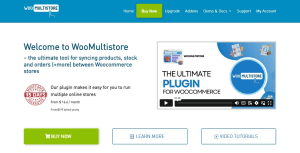
WooMultistore
The main features of WooMultistore:
- Check inventory, prices and product details across all stores or for individual stores.
- View and manage orders from all stores in one location, simplifying fulfillment.
- Create coupon codes across the network or customize discounts for specific stores.
- Define shipping zones and prices that apply across the network or define unique rules for each store.
- Obtain information on the performance of the entire network or analyze individual store metrics.
- Create user roles with specific permissions to manage different aspects of your multi-store network.
Pricing:
- Single network license: 199 $/year
- 5 developer licenses for 5 networks: 299 $/year
#2. WooCommerce Multisite Duplicate
Starting a new online store on your WooCommerce Multisite network just got a whole lot easier with WooCommerce Multisite Duplicate. This easy-to-use plugin eliminates tedious manual setup, allowing you to clone existing stores with just a few clicks. Duplicate products, variations, images, settings, even orders – copy an entire store to use as the basis for a new one. This saves significant time and effort, making it ideal for quickly launching similar stores or testing new features and designs in a safe environment before going live.
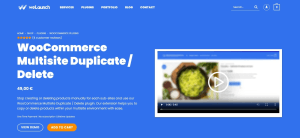
WooCommerce Multisite Duplicate

The main features of WooCommerce Multisite Duplicate:
- Clone an existing WooCommerce store to your Multisite network in minutes.
- Choose to copy the entire store or select specific elements such as products, categories or settings.
- Eliminate manual configuration and data entry for new stores, enhancing workflow.
- Easily create websites to test updates or new features without affecting live stores.
- Safely test new themes, plugins, or save configurations in a copy before applying them to live sites.
Price: €49 ≈ 54 $
#3. Multistore Multiseller
Want to create a bustling online marketplace where multiple sellers can sell their products under the umbrella of your brand? This plugin turns your WooCommerce Multisite setup into a thriving hub of independent sellers, each managing their products, inventory, and orders across their own designated stores. You can maintain central control of the platform, setting commissions, managing suppliers, and ensuring a consistent brand experience across all stores.
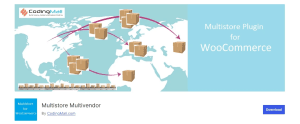
Multistore Multiseller

The main features of Multistore Multivendor:
- Each seller has their own storefront with a customizable design and product catalog.
- Easily define total or individual commission rates for each supplier.
- Automate supplier payments or manage them manually through integrated payment gateways.
- Review and approve supplier applications, manage supplier accounts and set permissions.
- Tailor the market for specific needs with various customization options and extensions.
Pricing: Free
In the fix it, finding suitable solutions is binding. Experienced developers can provide clear guidance for each business so that it can effectively enter the multi-store space, without problems, seamlessly, and with absolute success.