

Magento 2 & WooCommerce Tik Tok Pixel.
Ads and their personalization are a powerful tool in the hands of merchants for both large and medium-sized businesses. They allow an online store owner to reach the most suitable buying audience possible, to increase conversions and reduce the financial resources spent on ads. Thus, the benefits multiply. Setting up the Magento 2 & WooCommerce Tik Tok Pixel allows owners of these platforms to get more conversions on the top-growing social media platform Tik Tok, with millions of users worldwide.


About Tik Tok Pixel.
The Tik Tok Pixel is a piece of code that can be placed on a website and allows it to share events with Tik Tok. With any of the Tik Tok for Business tools, the pixel can help calculate website traffic, measure the performance of advertising campaigns, optimize campaigns, and find new customers. It is understandable that connecting to a Magento 2 and WooCommerce website, the Tik Tok pixel will offer an online store enormous flexibility and margin of profit opportunities.
How the Tik Tok Pixel works.
Once the pixel is successfully set up on your Magento or WooCommerce website, the pixel will share information about when an action occurs on your website, based on the events you have set up. As a reminder, it is recommended to set up events that reflect the complete customer journey on your website, from viewing a product detail page to adding a product to cart and making a purchase.
Note: The pixel collects information that is available through standard web browsers, such as Chrome. This includes:
- Information about advertisements/events: Information about the ad a person clicked on on TikTok or an event that was triggered.
- Timestamp: The time the pixel event was fired. This is used to determine when actions occurred on the website, such as when a page was viewed, when a product was purchased, etc.
- IP address: Used to determine the geographical location of an event.
- User Agent: Used to identify device brand, model, operating system, and browser information.
- Cookies: First-party cookies are optional, but third-party cookies are enabled by default with the Tik Tok Pixel. Cookies help measure, optimize, and target campaigns. Performance is enhanced when first- and third-party cookies are combined with Advanced Matching.
- Metadata & button clicks: These include descriptive page metadata (e.g. page titles and product information), structured microdata, page performance data (e.g. page load times), and button clicks (e.g. button name, descriptive text, and attributes).
View Tik Tok Pixel data.
It is recommended to use Tik Tok For Business Tools, such as Pixel Helper, to review data sent to Tik Tok to ensure it is compliant with data sharing policies and does not include data that may be considered sensitive.
For more information about data collection policies, one can refer to the TikTok Business Product Terms (Data) and the TikTok Privacy Policy.
Related articles: What is social media marketing?
Initializing the Tik Tok Pixel.
Initializing the Tik Tok Pixel is a relatively easy process, but when it comes to platforms like Shopify, it requires further steps and the appropriate extensions, and it is best to have the help of a professional for proper integration.
- In Tik Tok Ads Manager, select Assets and click Event.
- In the Web Events section, select Manage.
- Click on Set up web events.
- Select Manual setup as the connection method.
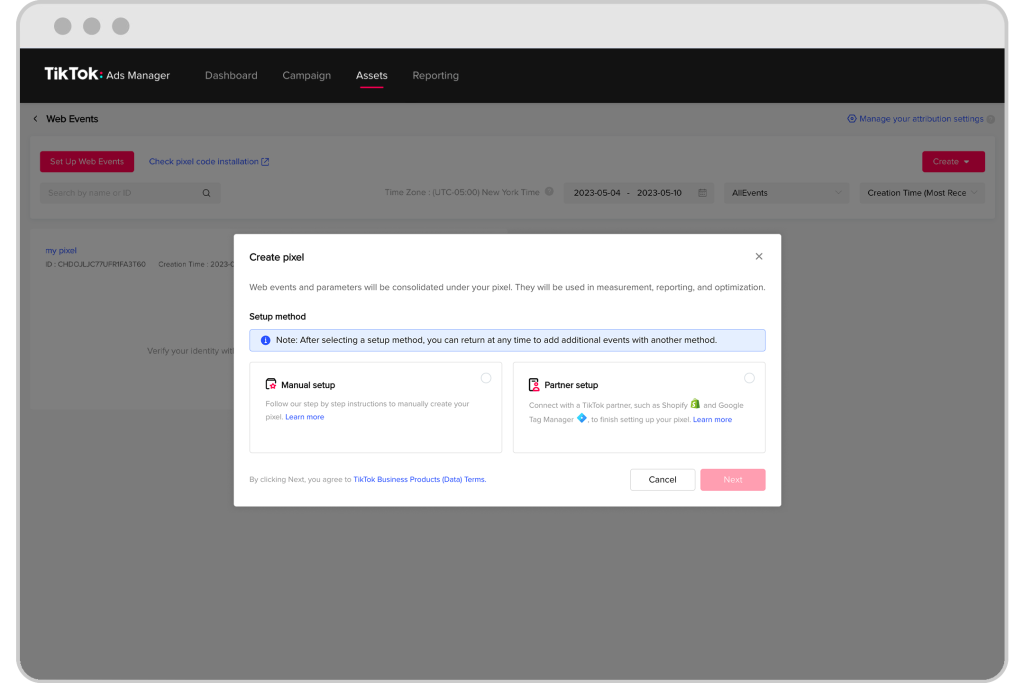

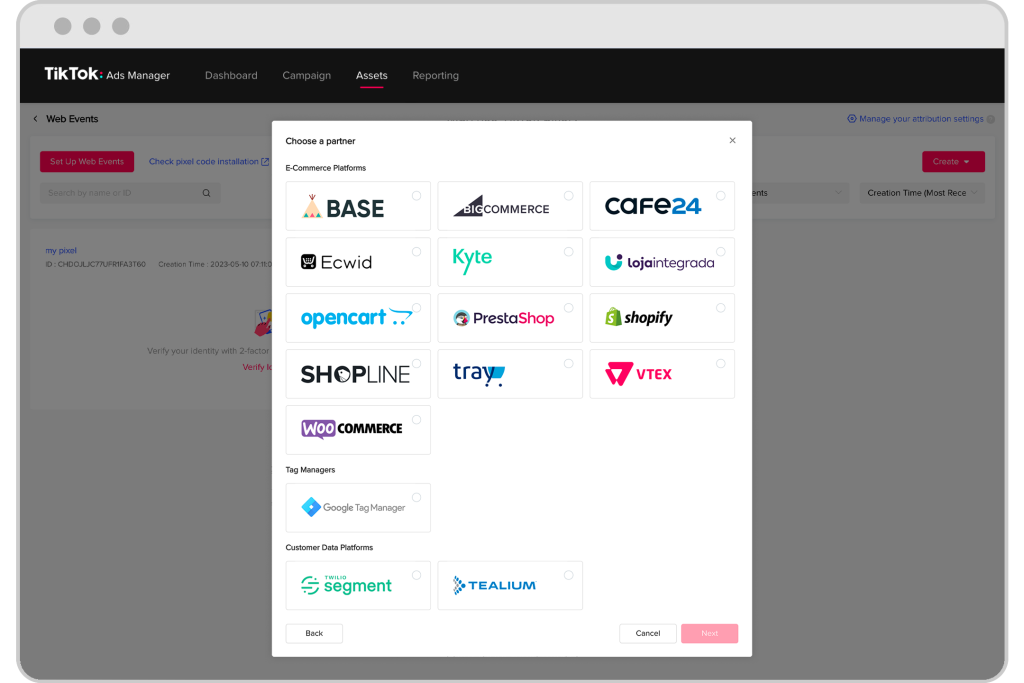
Note: The Partner Setup option opens to a page where different supported TikTok partners can be selected for integration, such as Shopify and Google Tag Manager.
Reporting incidents to the Administrator.
After setting up the Tik Tok Pixel, there are three charts in Event Manager to view data:
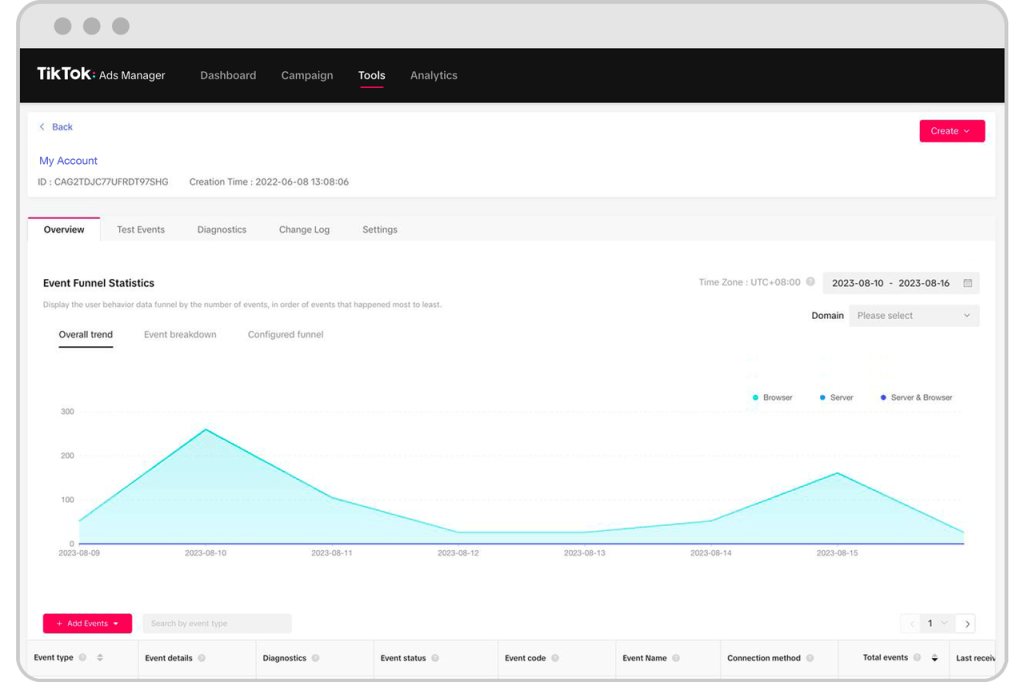

- Line chart of total events to help understand the overall trend of the movement.
- An event-level analysis to show the connection method per event, which is useful for verifying de-indexation.
- Funnel event bar chart to help cross-check whether the traffic in the funnel makes sense (Event Funnel Statistics).
Advantages of using Tik Tok Pixel.
In Magento 2 and WooCommerce stores, integrating the Tik Tok Pixel offers many advantages. Tik Tok is now a platform with many product advertisements and the conversion rate is at the highest levels. This offers businesses an additional or even exclusive tool to promote their products or services.
The power of Pixel offers many opportunities to increase traffic, increase conversions, and brand awareness.
However, it is very important to choose a professional to properly integrate the Tik Tok Pixel into a business’s website. This will provide the maximum possible benefits of the platform, especially for Magento stores, as it will offer all the tools and metrics available and not in a limited format. Competition is high even among medium-sized businesses and the right moves will give you the advantage in the market.
Can anyone contact its developers? Fixit.gr, for a complete integration into your Magento 2 and WooCommerce website, as well as to get tips on using the Tik Tok Pixel.
Related articles: Creating a loyalty program for a Magento 2 store
Epilogue.
WooCommerce and Magento 2 are among the most popular platforms for e-commerce stores worldwide. Now, you can connect any website to the Tik Tok Pixel, which will help you boost conversions, visitors, and brand awareness. By choosing the right professionals to properly integrate, guide, and maximize the use of the tools offered by the Tik Tok Pixel, your business will remain competitive and efficient in today's ever-evolving landscape.