

How useful is Cron? Job in Magento.
Choosing to develop an online store is a constant challenge. Competition is increasing and success from failure can be judged by an infinitesimal detail. As long as the human factor intervenes in a sector, especially with such sensitivity, there will be mistakes. However, mistakes, when they have to do with commerce, can also be decisive for a business, no matter how small it is. At this point, because an eCommerce business has to manage a lot at the same time, automation must be created for things that have a periodic use. That's where the Cron Job comes in, a tool that, if used correctly, can offer a lot.
What is a Cron Job?.
Cron Job is a tool that can be used by online store administrators or programmers. In essence, it can be created with the appropriate commands, a routine for tasks that are performed frequently. Thus, with this automated system, in addition to simplifying some tasks, there is no human factor involved for manual entry. In this way, possible failures or omissions are reduced and the response times of certain tasks are increased.
Where can Cron Job be used?.
Actually, any process can be triggered with cron. But if out of box magento is used, there are some cron jobs that can be executed in the Cron Job management panel in Magento.
- System cleaning from temporary waste.
- Sending newsletters.
- Location map update.
- Notify customers of new information.
- Update currency settings.
- Recalculation of prices.
In short, Cron is a “timer” used in Magento. It allows Magento tasks to be scheduled and executed automatically. Specifically for tasks such as:
- send transaction emails
- exchange rate update
- clearing logs, etc.
In Magento, such an extension is called Mage_Cron and is available if Magento eCommerce is installed on the host computer.
Cron Job Scheduling.
There are three main ways to trigger a cron job:
- Cron job extension
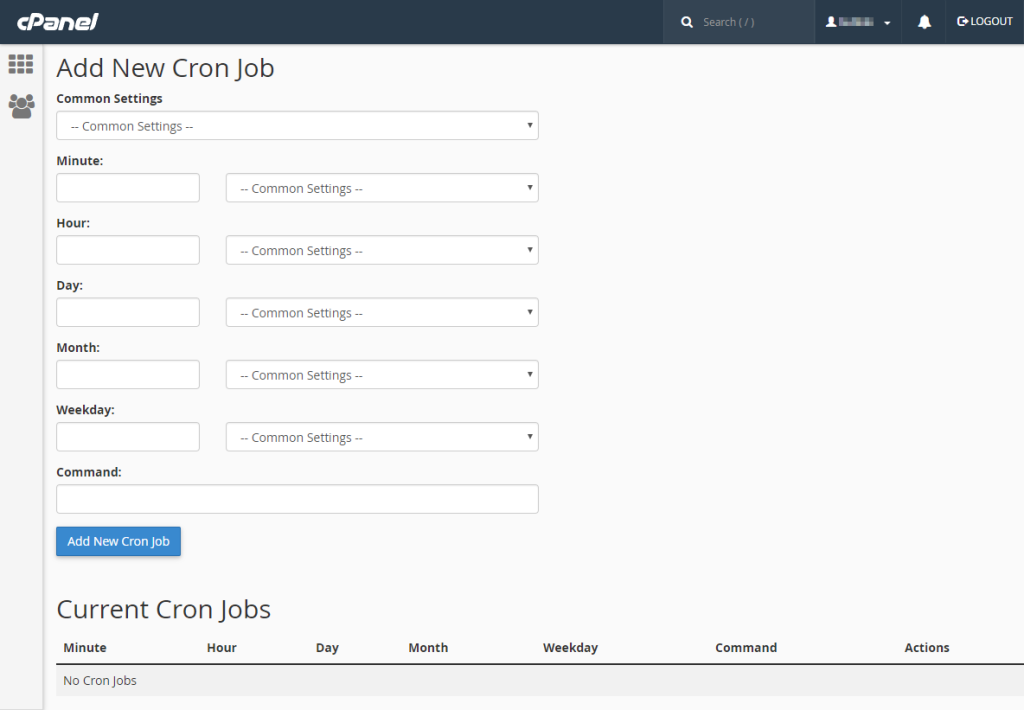
- cPanel
- cron.sh or cron.php files. These three variations have been chosen as the simplest and can be started even without specific coding skills.

Cron scheduling in Magento.
As you can see, each task is measured in minutes.
1) Run Cron Job in Magento with Cron Job Extension.
An extension like Cron Job Runner can be downloaded. This extension or any similar one allows any cron job to be triggered directly from the admin panel.
2) Launch it from cPannel.
By logging into cPannel, a cron job can also be started. In cPannel, the Advanced setting should be found. There is a settings button. In the Cron job field, an email should be placed. Emails will be received every time the cron job is executed. In these emails, it will be stated how the cron job is executed in the Magento store.
3) Cron Job in Magento using the cron.sh or cron.php file.
Before the custom cron job can be created, the crontab must be opened by the owner of the Magento file system.
Execution of the command:
crontab -l
The following indication will then be obtained:
#~ MAGENTO START c5f9e5ed71cceaabc4d4fd9b3e827a2b
* * * * * /usr/bin/php /var/www/html/magento2/bin/magento cron:run 2>&1 | grep -v “Ran jobs by schedule” >> /var/www/html/magento2/var/log/magento.cron.log
#~ MAGENTO END c5f9e5ed71cceaabc4d4fd9b3e827a2b
To create a cron job, 2 things are required:
- Creating a basic Module.
- Placing it Cron/SomeCronModel.php to this.
<?php
namespace VendorName\ModuleName\Cron;
class SomeCronModel
{
public function execute()
{
//your cron job code
}
}
Placing it etc/crontab.xml folder there:
<?xml version=”1.0″?>
<config xmlns:xsi=”http://www.w3.org/2001/XMLSchema-instance” xsi:noNamespaceSchemaLocation=”urn:magento:module:Magento_Cron:etc/crontab.xsd”>
<group id=”default“>
<job name=”vendorname_modulename_cron_somecronmodel”"instance="”VendorName\ModuleName\Cron\SomeCronModel”"method="”execute“>
<schedule>* * * * *</schedule>
</job>
</group>
</config>
- Default – the ID of the group to which the cron job will be included.
- vendorname_modulename_cron_somecronmodel – the name of the cron job. It must be unique, so it is recommended to create it from the name of the cron job model.
- VendorName\ModuleName\Cron\SomeCronModel – the name of the cron job model.
- Execute – the name of the method executed on the cron job model.
- * * * * * – the frequency of the cron job.


Using Cron Job ensures accuracy in store actions.
Epilogue.
It is quite understandable that the existence of a cron job in a Magento store is mandatory. Regardless of the size of the store, it has many benefits. The automated periodic task will serve to minimize errors and even to the greater professional profile of a Magento store. Whether the store owner chooses to install the cron job or the programmer, it is a process that will enhance the presence of the store and its reliability.