Magento module – Google Analytics GA4.
Google Analytics 4 is the most advanced version of the web analytics tool offered by Google. Integrating Google Analytics 4 with Magento 2 is an extremely important task to collect more detailed and meaningful information about visitors and their behavior. The advanced version of Google Analytics brings additional details along with advanced reporting capabilities, which makes it difficult for online store owners to use it on their website. But is there a way to set up Google Analytics 4 with a Magento store so that important information can be obtained?;
What is Google Analytics 4.
Το Google Analytics 4 είναι ένας νέος τύπος ιδιοκτησίας με προτεραιότητα το απόρρητο, που περιγράφεται από την Google ως “μέτρηση επόμενης γενιάς”. Οικοδομείται και βελτιώνεται σε προηγούμενες ιδιοκτησίες του Universal Analytics με μια προσέγγιση προσανατολισμένη στο απόρρητο. Διαθέτει επίσης ολοκληρωμένες και βαθιές ενσωματώσεις με τις διαφημιστικές πλατφόρμες της Google και χρησιμοποιεί μηχανική εκμάθηση για να ενισχύσει τις πληροφορίες σχετικά με τη διαδρομή των χρηστών σε διάφορες πλατφόρμες και συσκευές. Το Google Analytics 4, μέσω της χρήσης των προηγμένων αλγορίθμων μηχανικής εκμάθησης της Google, μπορεί να παρατηρήσει και να αναλύσει σημαντικές τάσεις στα δεδομένα του ιστότοπου, όπως ένα συγκεκριμένο προϊόν ή τύπο προϊόντος που αυξάνεται σε πωλήσεις λόγω αυξημένης ζήτησης, επιτρέποντάς του να ειδοποιείται αυτόματα και να ενημερώνεται από αυτές τις τάσεις, επιτρέποντας να λαμβάνονται αποφάσεις προς όφελος της επιχείρησης.
Additionally, the enhanced capabilities provided by machine learning allow Google Analytics 4 to fill in significant data gaps that may exist due to software that blocks tracking scripts, cookie consent rules, and other privacy-related choices or configurations, making the data collected much more relevant. The new Google Analytics 4 platform is based on the Web + App property that Google tested in beta in 2019, which means it aggregates traffic and data from the web and mobile apps. In short, if your business brand has a mobile app, there’s no longer a need to separate data between two platforms (Google Analytics for Firebase in the case of mobile apps and Google Analytics for standard web traffic), as Google Analytics 4 now provides a unified view of both data streams.
Why is it necessary to migrate from Universal Analytics to Google Analytics 4?.
Since Universal Analytics is being retired in 2023, why should anyone migrate to a Google Analytics 4 property immediately? There are several reasons, but this does not mean that the existing Universal Analytics property should be terminated, as they can run in parallel. The main reasons to set up a Google Analytics 4 property as soon as possible are:
- Get ahead of the competition. Using Google's advanced machine learning models will ensure that the data collected is more relevant. It helps to predict trends earlier, so that business opportunities can be exploited before competitors.
- Historical data. Having historical data on the new platform is a surefire way to ensure that data-driven decisions continue to be made for the business, while the competition will still waste time building their data on other platforms.
- Over time, AI learns business patterns. AI takes time to examine patterns and learn from them, which means the earlier a business is connected, the better. Since it can make assumptions based on existing data, the more accurate it will be.
Για τη πλήρη κατανόηση των Magento Modules, υπάρχει εκτενές άρθρο όπου μπορεί να κατανοήσει κανείς τη χρήση τους και το πόσο απαραίτητα είναι, “How important are Magento Modules?;“.
How much does a business need Google Analytics 4.
Whether it's a blog, store, social media page, or any other type of website, having relevant visitor data is crucial for its proper functioning, regardless of its size. The fact is, more and more businesses are turning to online commerce, resulting in greater competition. All you need to do is configure Google Analytics and you will be able to get the information you need from its AI.
Integrating Google Analytics 4 with an online store to set up basic tracking is quite simple. Below are the configuration steps required to implement it. basic monitoring of Google Analytics in the Magento 2 store.
Create a property in Google Analytics:
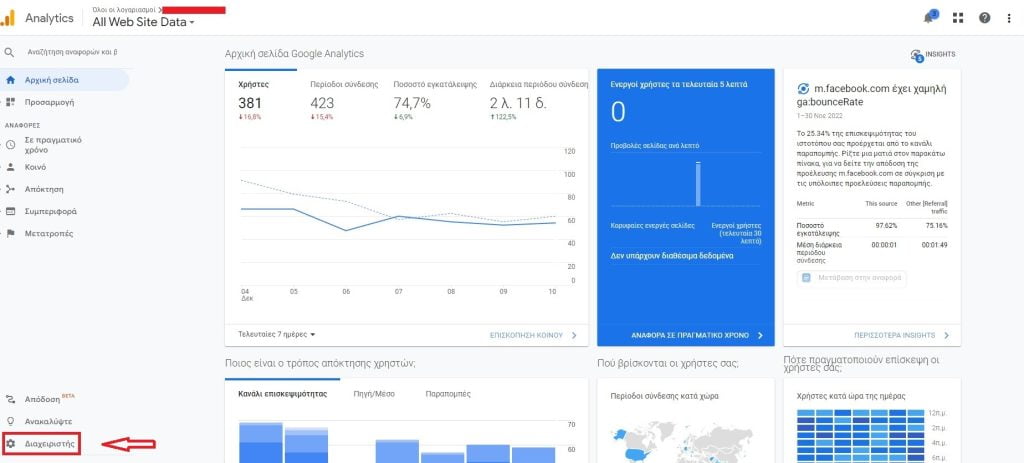
- Login to the platform Google Analytics using Gmail and navigating to properties from the "Administrator" field.
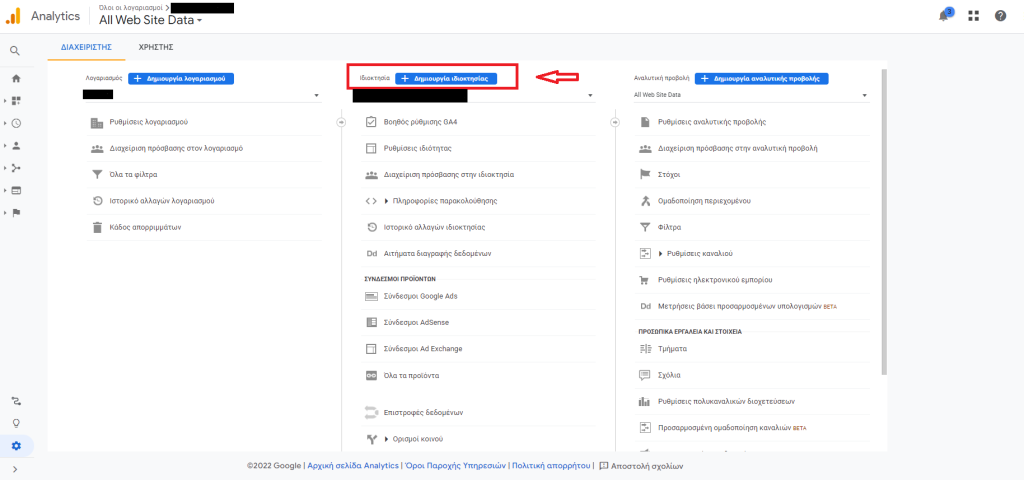
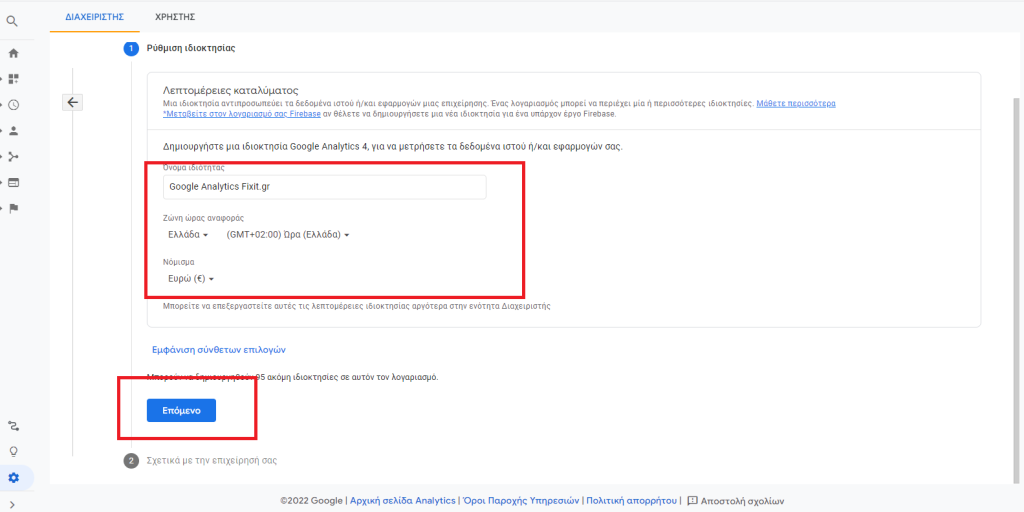
- Επιλογή του πεδίου “Δημιουργία Ιδιοκτησίας”. Εκεί θα τοποθετηθούν, το νόμισμα, η Χώρα, η ώρα αναφοράς και στη συνέχεια “επόμενο”.
- Προαιρετικά, επιλέγονται από πόσα άτομα αποτελείται η επιχείρηση ή σε τι μετρήσεις θα στοχεύσει η συγκεκριμένη ιδιοκτησία. Στο τέλος, επιλογή του πεδίου, “Δημιουργία”.
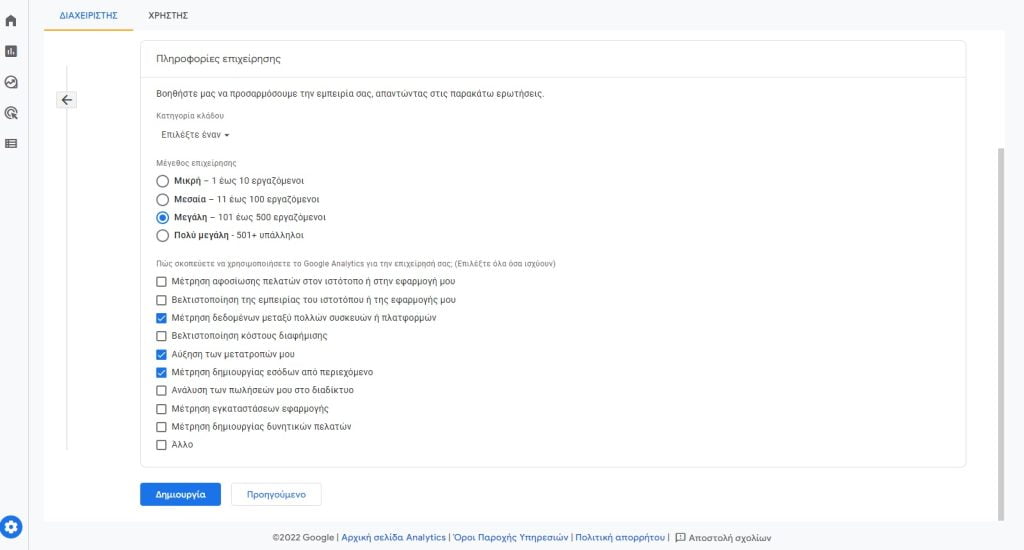


Connecting Google Analytics 4 to a Magento 2 store.
Εφόσον έχει δημιουργηθεί η ιδιοκτησία στο Google Analytics 4, μένει να τοποθετηθεί η ετικέτα σύνδεσης του ιστοτόπου (κατάστημα), με τη πλατφόρμα Analytics. Για να επιτευχθεί αυτό σε ένα κατάστημα Magento, θα πρέπει να πραγματοποιηθεί η σύνδεση “μη αυτόματα”. Στις “Ροές δεδομένων” στη καρτέλα της ιδιοκτησίας, μπορεί να βρεθεί η ετικέτα σύνδεσης του Google Analytics 4 με το κατάστημα Magento.
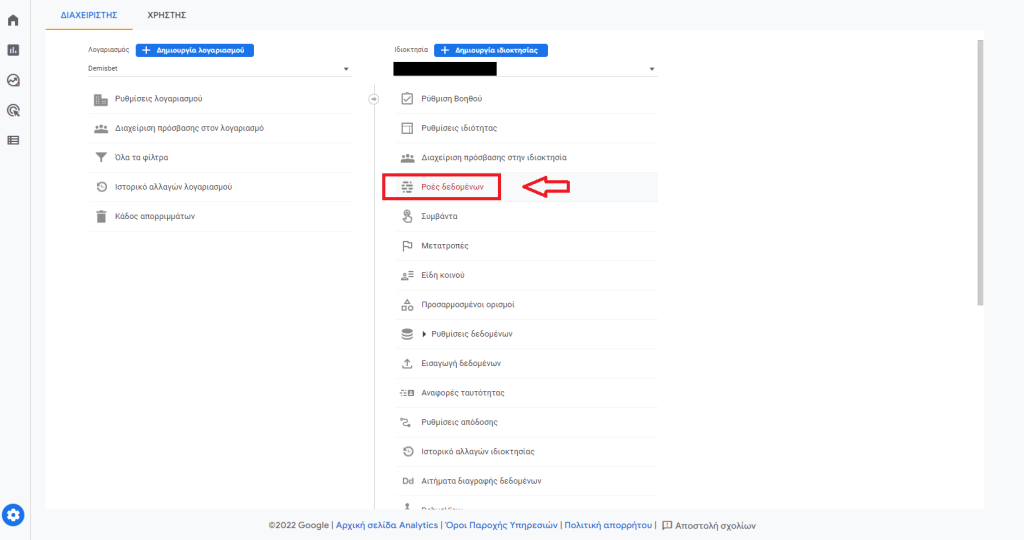

By selecting web feeds and then View tag instructions, manual installation is now accessible.
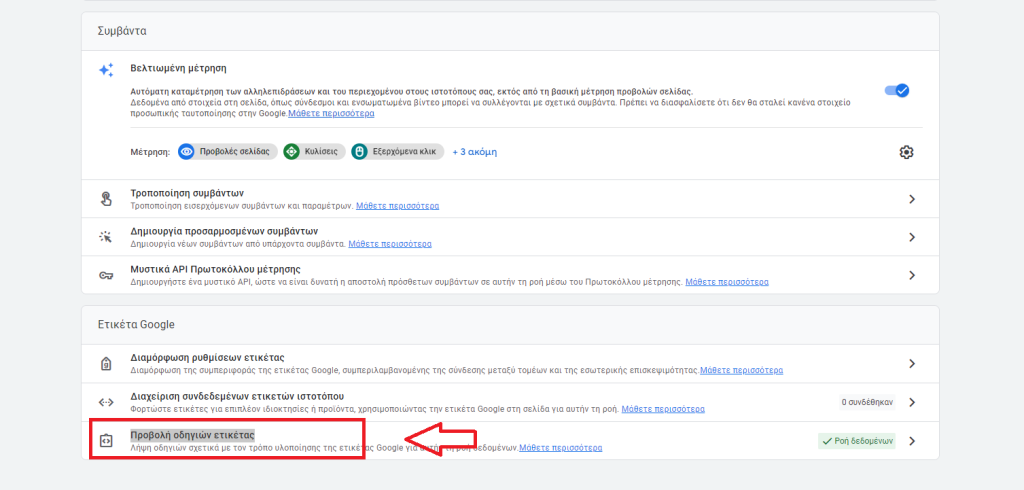

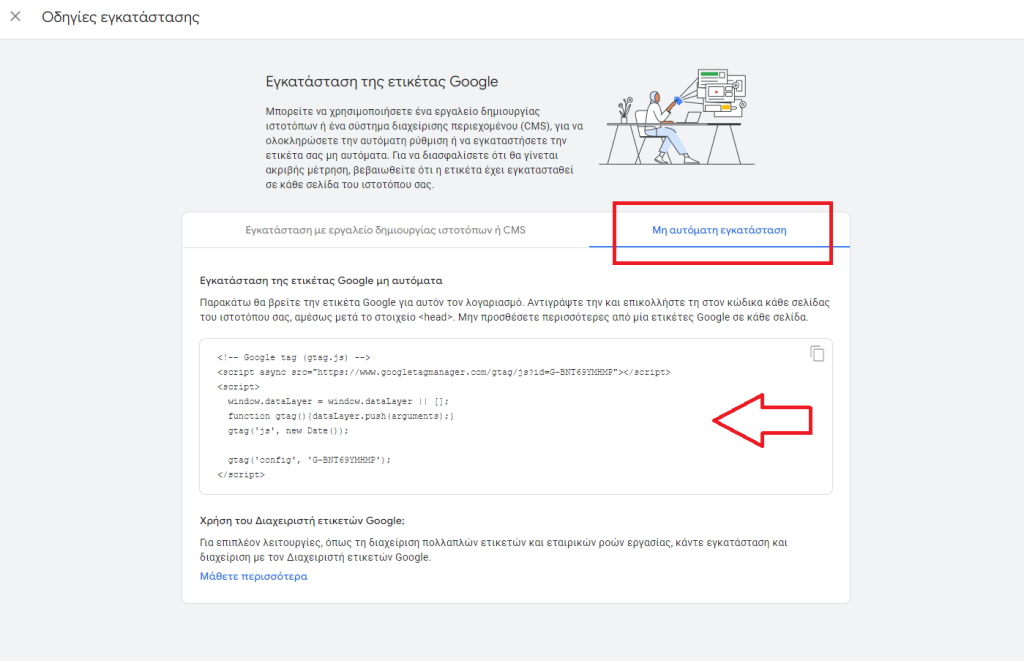

Actions to be taken in the Magento store.
Εφόσον υπάρχει πλέον η ετικέτα ιστότοπου Google Analytics 4, γίνεται μετάβαση στην ενότητα “Διαχειριστής” Magento και προστίθεται στον ιστότοπο ώστε να συνδεθούν.
- Log in to your Magento admin and go to Content -> Design -> Configuration.
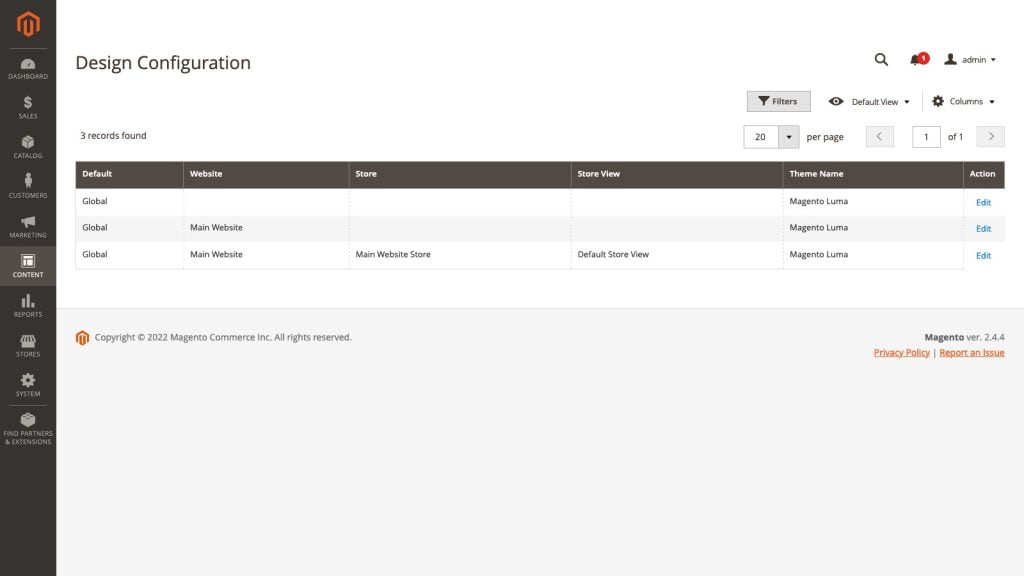

- Select the Magento 2 store to which the Google Analytics code (Global Site Tag) will be added and click the Edit button.
- HTML Head section development and paste the Google Analytics code in the Scripts and Stylesheets section.
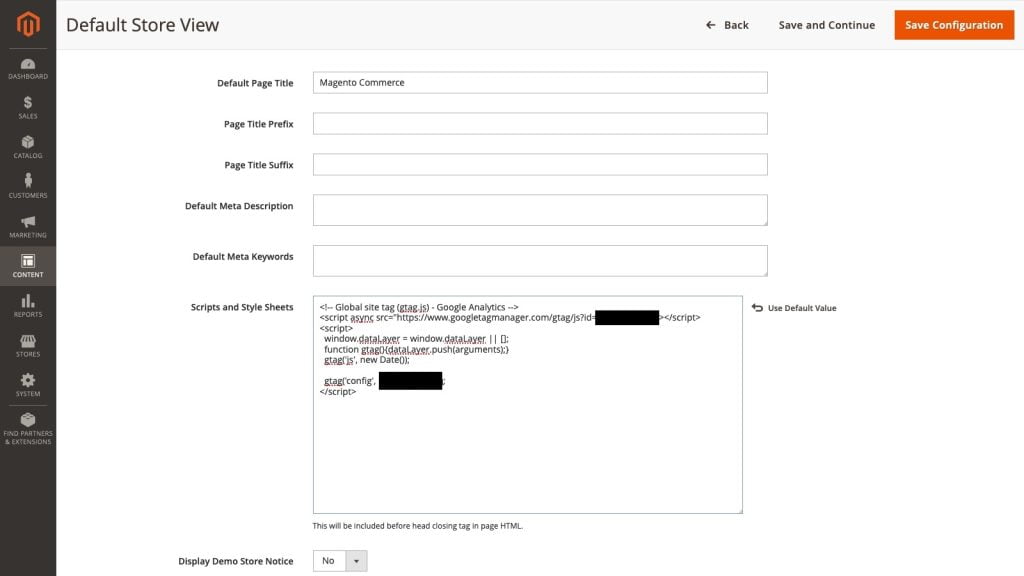
- Click on the save configuration button and go to the Cache Management section of the Magento 2 Admin by clicking on System and going to Tools -> Cache Management.
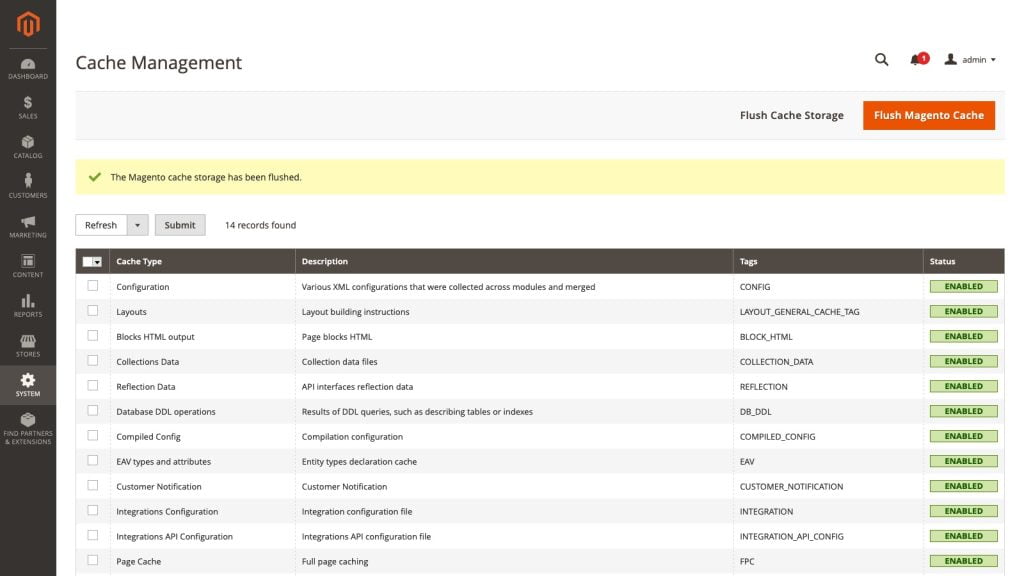
- Click on the button Flush Magento Cache and reload the Magento 2 store interface.
The store is now tagged with the Google Analytics 4 tracking code.
What information does Google Analytics 4 offer?;
With the above actions, a Magento store is now connected to Google Analytics 4 which now offers the appropriate information. But what is this?;
- Page views.
- Scroll the page.
- Website search.
- Outbound clicks.
- Video monitoring.
- File downloads.
Unfortunately, for many businesses or online stores, this information is not enough to grow and compete. While these are all great metrics, most ecommerce stores using Magento 2 will require more specific and specialized information about their users and products that can help create strategies and make decisions that will ensure they remain competitive. These metrics include things like:
- Personalized searches.
- Revenue (return per product).
- Product detail measurements.
- Checkout steps (billing, shipping, payment).
- Delivery-purchase completion step.
- Product displays.
- Product clicks.
- Cart actions (additions, subtractions).
- Use a coupon code.
- Impressions and clicks of advertising material.
These are some of the data that can be requested from Google Analytics 4 via module and more can be added.
How can more data be obtained from Google Analytics 4?;
One of the main pillars of running a Magento store is the use of modules. An article was recently posted on how these extensions are created (basic principle), "Creating Magento Modules". In the case of Google Analytics 4 as well, more specialized information can be extracted using a Module for Google Analytics 4. More information about this module can be found at Fixit.gr and come to communication with its development team. In the modern competitive field of e-commerce, every piece of information is valuable and can be used to the benefit of the business, using the benefits of Google Analytics 4.
How can the Module for Google Analytics 4 be obtained?;
If there is interest in acquiring Google Analytics 4 for a Magento store, then there is a competitive option. In Fixit.gr Shop One can find affordable Modules with full support from Greek developers for whatever is required by a Magento store.