

The current commercial environment has made the e-commerce industry an integral part of the global economy. This means that platforms that develop e-commerce must maintain extensive security for many important reasons. However, one of the leading e-commerce platforms of choice, known as WooCommerce, faces problems with cybersecurity issues. In total, there are more than 5 million websites that have the WooCommerce Plugin installed.
What is WooCommerce?;
WooCommerce is a free WordPress plugin. It has been mentioned in previous articles that WooCommerce powers more than 40% of online businesses. It is accessible from the plugins directory and thus acquires the knowledge of all the essentials for creating an online business, selling physical or digital goods.
Additionally, the plugin can also help run websites or can be used to handle purchases for printables and various other customized products. Whether the business is about selling a few products or a retail startup to grow a business, WooCommerce can be used to add all the important e-commerce features to a WordPress website.


Woocommerce, a WordPress plugin for e-commerce.
Setting up and running a WooCommerce store with a basic shared hosting plan is easy. This hosting will power a business with features and support and help build a brand. WooCommerce plugins come with payment and shopping cart features and also support an extensive range of options. Using these options, one can set up exclusive events, products, and landing pages.
Πρόσφατα υπήρξε σύγκριση της συγκεκριμένης πλατφόρμας του WooCommerce με μια κορυφαία του χώρου για κατασκευή καταστήματος ηλεκτρονικού εμπορίου, “Magento vs WooCommerce. Which is better for an online business?;“.
What damage can an "attacker" cause to WooCommerce?
Hackers use some of the most creative and illegal methods when it comes to hacking WordPress and WooCommerce websites. While there are no obvious signs to tell if a website has been hacked or not, spotting some of the common signs that WordPress has been hacked will help.
- Unauthorized website redirection to another URL, also known as a WordPress malware redirect hack.
- Inappropriate content on the website's home page.
- Limited access to the admin control panel.
- Μια ασυνήθιστη μείωση της επισκεψιμότητας, η οποία μπορεί να οφείλεται στο προειδοποιητικό μήνυμα της μαύρης λίστας της Google ή στον ιστότοπο που εμφανίζει το μήνυμα “Αυτός ο ιστότοπος μπορεί να παραβιαστεί” στα αποτελέσματα αναζήτησης.
- Browser errors.
- Unexpected increase in website registration.


Security of the online store platform, the most important thing for safeguarding personal data.
Many failed connection attempts.
It is of utmost importance to have 2-factor authentication enabled and choose strong passwords to keep those who want to harm your online store (hackers) at bay. But, if you allow a hacker to enter passwords thousands of times, they may eventually catch up. In fact, they use botnets to try different password combinations.
Unfortunately, WooCommerce does not have a security protocol to limit these login attempts.. Its admin panel is open to any person who wants to log in. However, there is no identification system that prohibits login attempts from those IP addresses that have been involved in cyberattacks earlier.
To fix this, a plugin is needed to block these unknown IP addresses that repeatedly enter incorrect passwords. And that’s where WP plugins like Wordfence come in. Once installed, they can identify unknown IP addresses with multiple failed login attempts. It blocks these IP addresses from attempting to log in. So, the only way for someone to log in is to request admin approval, adding a lot of protection to your WooCommerce store.
Absence of data encryption.
Unfortunately, WooCommerce does not have a built-in data protection system. That’s why it’s best to have a third-party tool to protect your website from hackers. While this point is not directly related to WooCommerce vulnerabilities, it directly affects the security of an online store. If attackers manage to see what is being transferred between the store and customers, they can steal sensitive data such as email addresses, banking details, credit/debit card details, usernames, etc.
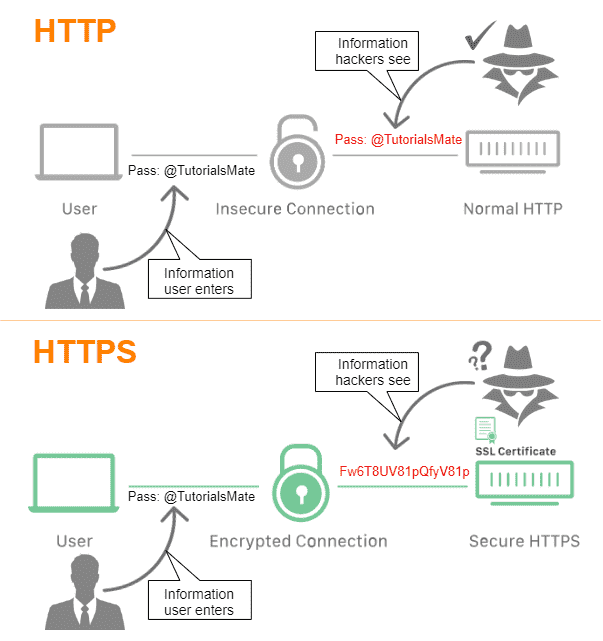

Importance of data encryption.
Whether it is an e-commerce website or a simple website, SSL is mandatory for everyone. Google considers SSL as a decisive factor when ranking sites in its SERP (Search Engine Results Pages). SSL plays an important role in e-commerce websites, allowing them to accept payments online. According to the Payment Card Industry guidelines, every e-commerce website must have SSL for online transactions. SSL certificates that are generally considered reliable for WooCommerce are the economical, rapidSSL or Comodo SSL certificates and come from the house of trusted CAs.
Add-on and plugin conflicts.
There is a tendency to install too many plugins to make your website or online store look better. But this causes several problems in their functionality. Different plugins are designed to configure the backend, in their own way. When multiple of the same type are installed on a website, they all try to gain access, resulting in its functionality not evolving. The situation is even worse when these plugins are installed for security reasons. Too many plugins managing the security of a single WooCommerce website can cause many security vulnerabilities.
Ωστόσο, υπάρχουν πλατφόρμες όπως η Magento, στην οποία η ύπαρξη επεκτάσεων κατέχει ουσιαστικό ρόλο, “How important are Magento Modules?;“
You should stop installing many plugins immediately. They can in no way help your WooCommerce website become secure. The Plugin is there to facilitate certain processes, such as filling out contact forms, newsletter signup popups, and detecting potential threats.
Πάρα πολλά λοιπόν από αυτά του ίδιου είδους προσθέτων θα εμποδίσουν το ένα τη δουλειά του άλλου. Επιπλέον, δεν είναι όλα τα πρωτόκολλα ασφαλείας τόσο ασφαλή όσο ένα πιστοποιητικό SSL. Όταν εγκαθίσταται μια προσθήκη ασφαλείας, δίνεται πρόσβαση στο backend ολόκληρου του ιστότοπού. Έτσι, εάν αυτά τα Plugins παραβιαστούν, ο ιστότοπός θα βρεθεί σε τεράστιο κίνδυνο παραβίασης δεδομένων. Γι’ αυτό είναι καλύτερο να μην προτιμούνται πολλά Plugins για ασφάλεια. Εάν πρέπει, ιδανικό είναι να υπάρχει εμπιστοσύνη μόνο σε αυτά που έχουν τις καλύτερες κριτικές και βαθμολογίες στο Google.
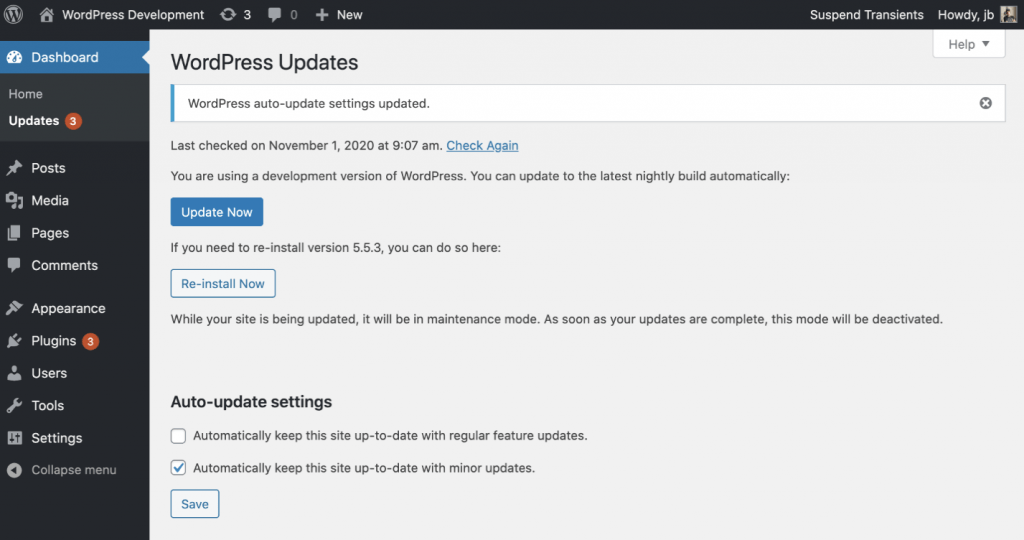

Checking plugin conflicts in WooCommerce.
No automatic platform updates.
Millions of websites rely on WordPress for their daily operations, but a security breach can significantly disrupt all those businesses that rely on it.
Unfortunately, the WooCommerce or WordPress do not have automatic updates available. This means that users need to regularly check for updates to ensure their software foundation is strong.
There is no magic or automated way to fix this problem, other than another plugin. While it is a good practice to check for updates regularly, it is recommended to use a WP plugin like Companion Auto Update if you don’t have the option to check regularly. Companion Auto Update will send an email notification whenever an update is available. This eliminates the need to constantly check for new updates.
Epilogue.
There is a huge list of security vulnerabilities related to WordPress and by extension WooCommerce. However, they may be more specific to each situation as well as the way they are resolved. So, if WooCommerce is chosen as the platform for your e-commerce store, the security factor should be taken into account, the most important for securing customer data and guaranteeing service provision.