
WordPress is a platform for building websites or, with the appropriate addition, an online store. Over 40% websites worldwide are built on this platform. However, security issues can far exceed the number one can imagine and this is due to many factors, in addition to the possible security gaps that WordPress may have. Thus, often someone who owns a website on WordPress can fall victim to a hacker attack. What actions should be taken in this case?;

What is WordPress?;
WordPress is a user-friendly platform that allows you to build a website without any coding knowledge. This is its biggest advantage, but also its disadvantage. So, while it easily reaches even the most ordinary user and offers them the tools to build a website or an online store, it leaves them completely exposed when it comes to security. WordPress is widely used and most of the web pages are built with it. There are many free and paid themes for someone to choose from, in order to present a personalized and unique result. It does not require programming knowledge or Web developer/design.
However, building a website doesn't just require using WordPress. You also need a domain name, which is essentially the identity of the page, and a web hosting provider.
Is a WordPress website secure?;
No website, on any platform, can be 100% secure against a cyberattack. What can be done is to have as many obstacles and “closed doors” as possible, to discourage the would-be attacker and turn elsewhere. The disadvantage with WordPress is mainly that it is handled by people with different levels of knowledge in the field of security and website construction. This will make a page that has not taken the appropriate measures more vulnerable to an attack. A simplistic approach, without password protection, without SSL certificates and without individual actions, will certainly become a very easy target for a hacker.
Doesn't WordPress provide any security?;
Fortunately for most, WordPress has some tools related to the security of the website or online store. However, the main source of security is found in the part of the web hosting provider, which usually also provides data encryption with the addition of SSL certificates. Thus, a fairly basic core of security is provided in the first year on a WordPress website, but it is not enough. WordPress, supports its operation, or at least a large part of its operation, on extensions (plugins). Some of these plugins, therefore, provide security to the website, to a satisfactory degree, but must be installed by the user.
There is a more comprehensive article on WordPress security, “7+1 ways for maximum security in WordPress.“
Victim of a WordPress hacker attack.
No matter how many measures are taken (let alone if they are not taken), there may still be a security gap and a website may fall victim to a hacker attack. In this case, the victim should first take immediate actions and then take secondary actions.
The key to all of this is to regain access and ownership of the website.. Any unauthorized users should be removed immediately, and the page should display that it is under construction/maintenance to anyone trying to visit it.
How can a WordPress page owner realize that they have been the victim of a hacker attack?.
In order to take action to repair damage to a page, one must first identify that they have been the victim of a cyberattack. While such an attack can be quite methodical and not leave many traces, there are always signs that should raise alarm bells.
- Unable to connect to the website.
- The website has changed without the administrator or another user making any changes (for example, the home page has been replaced with a static page or new content has been added).
- The website is redirecting to another website.
- When the administrator or other users try to access the site, they receive a warning in the browser.
- When searching for the website, Google warns that it may have been hacked.
- A notification has been received from the security plugin about a violation or unexpected change.
- The hosting provider has warned about unusual activity on the account.
If any of the above occurs, it should alert the owner or administrator of a WordPress page and they should take further action.
What actions should a victim of a hacker attack take?;
As soon as there is a suspicion that the website has been the victim of a hacker attack, some immediate actions should be taken. Thus, in the first instance, access to the website and its tools must be ensured. In detail:
- Access to the website.
- Show that the website is under construction/maintenance.
- Updating themes and plugins.
- Removing unauthorized users.
- Cleaning of all contaminated elements.
- Reinstalling add-ons or themes that aren't working.
- Resubmit sitemap.
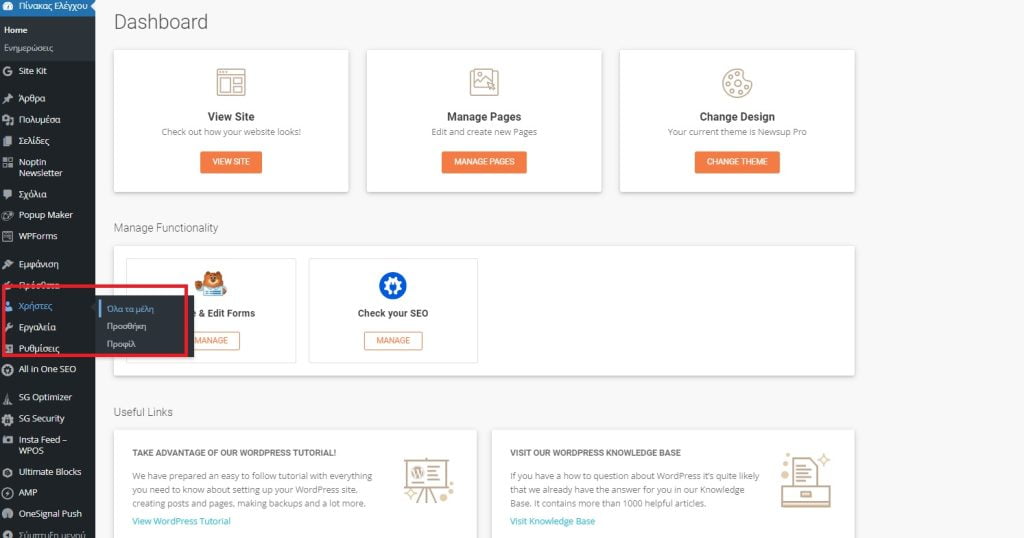
Removing unauthorized members.
Access to the WordPress website.
The administrator of a website that has been hacked must regain control. Since it is obviously impossible to determine which password the attacker used to gain access, all passwords for both WordPress and the hosting provider must be changed. This will ensure that the attacker cannot regain control of the site in the first place.
Page under construction/maintenance.
The next step is that the page should show visitors that it is under construction or maintenance. This way, until the individual problems are fixed, it will not be visible to third parties that the website is experiencing such situations. One solution to achieve this easily is with a WordPress plugin that shows visitors exactly that, that the page is under maintenance.
Updating themes and plugins.
Many times, an attacker can find security holes in themes or plugins. That’s why updates are an important part of maintaining a WordPress site. More about maintaining a WordPress site can be found in a previous article, “WordPress Maintenance. What actions need to be taken?;“". When the administrator enters the page again, he should immediately update the themes and plugins he has installed. This way, any security gaps will be eliminated.
Removing unauthorized users and administrators.
The “users” field displays all those who have access to the website as well as their rights. If an unknown and unauthorized user is identified, then they must be removed immediately. It must be ensured that only those who have this right will have access to the page.
Clear all files.
At this point it is recommended to consult someone, a special programmer. So, while everything else may seem fine, there could be an infected file on the website and at some unexpected time it could start causing problems again. There are some ways to clean files and identify the infected ones, but it is best to have a professional check the website.
Reinstalling themes and add-ons.
After the above actions, some add-ons or even the main theme may not work. So deleting themes or add-ons and reinstalling them will solve the above problem.
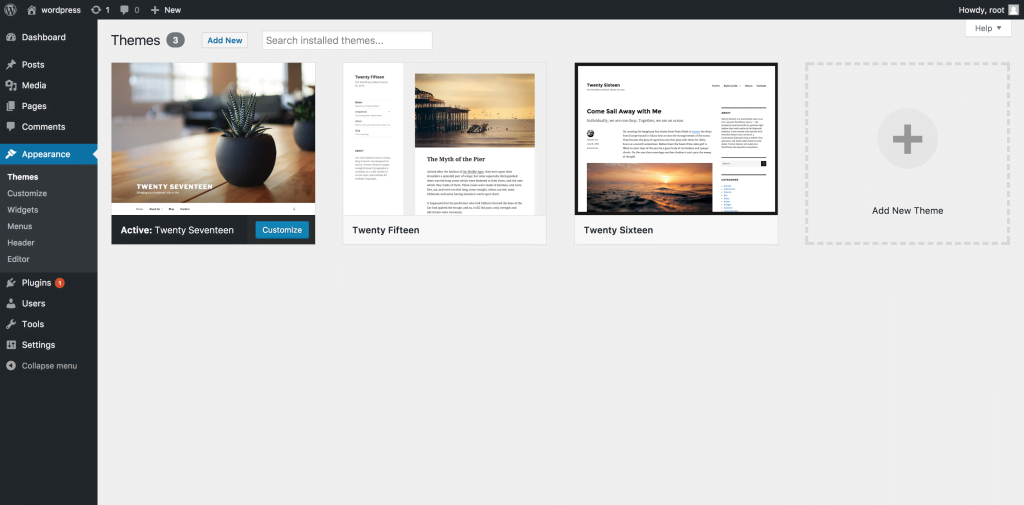
Installing the theme from scratch.
Resubmit sitemap.
Apparently, after a hacker attack, Google has marked the website as unsafe. So, the sitemap should be resubmitted to tell Google that everything is back to normal and the page has returned to its owner. To create the sitemap, you can simply use a plugin with SEO capabilities.
Epilogue.
Every website, whether built on WordPress or another platform, has a risk of falling victim to a cyberattack. However, actions should be quick and direct to secure the website's data as quickly as possible. It is always recommended to have the help of an experienced developer because the risk of file and data contamination can lurk even after some actions that may be taken. An expert will ensure the health of the website at 100%. There is always the option to have the actions carried out by non-specialized personnel, with all the risks that this may entail.