7+1 ways for maximum security in WordPress.
The most important area that a WordPress website administrator should focus on is security. It is also the area that most people do not invest enough in, resulting in serious damage to websites from hacker attacks. Beyond the functional part of a website, whether it is an e-shop or a website, the security sector must be taken seriously. By following some ways, WordPress website administrators can achieve maximum security.
Why is security needed on a WordPress website?;
There are many reasons, but in reality, security on a WordPress website is required for its viability. The ownership as well as the content of the page should be secured. This page could be an online store, a website or something non-profit. However, whatever is reflected on the website relies on visitors or potential customers. What could it cost if it were attacked by hackers? Of course, it would be something devastating as this alone would be enough for a website to lose its credibility and traffic. There could be leaks of user or customer data, interception of payment details and much more.
Can a WordPress website be 100% secure?;
No. It is extremely difficult to achieve this, but it can certainly be reduced to a high percentage. The more obstacles placed on a would-be attacker, the more likely they are to give up. So, if some steps are followed, it is almost certain that the website will not be targeted by hackers, or even if it does, it will be able to recover.
In what ways can security be achieved in WordPress?.
There are some methods that allow the administrator of a WordPress page to achieve high security rates on their website. However, beyond these, there are also basic moves that must be implemented on a website for security, otherwise it will not be able to stand up to the competition.
Implementation of SSL certificates.
Secure Sockets Layer (SSL) certificates are a standard used by millions of websites to protect online transactions with their customers. Obtaining one should be one of the first steps in securing a website. An SSL certificate can usually be purchased, but most hosting providers offer it for free. This standard technology creates an encrypted connection between a web server (host) and a web browser (client). Adding this encrypted connection ensures that all data transmitted between the two remains private.
An SSL certificate means greater website security.
Security extensions.
WordPress plugins are a great way to quickly add useful functionality to your website, and there are also several excellent security plugins available. Installing a security plugin can add a few extra layers of protection to your WordPress site without requiring much effort. However, overusing them can have an impact on your site’s speed and performance.
Removing unused WordPress plugins and themes.
While plugins can be a great help to a WordPress site, they can also be fatal at times. In some unused plugins and themes, would-be attackers can find security holes and enter a WordPress site with devastating results. Thus, it is recommended that themes and plugins that are not used be removed and deleted.
Update WordPress and plugins.
A hacker's greatest joy is to find an unpatched website. Thus, the security holes he will find are like a carpet laid out for him to enter a page. It is strongly recommended that regular updates be made to both the WordPress system and the plugins as they cover various security holes among other problems.
WordPress website maintenance.
Maintenance can include updating WordPress and plugins, but it also includes several other actions. Performing these actions ensures a fairly high level of security on a WordPress site, as it provides several safeguards in the event of a hacker attack.
As a guide, there is a previous article on WordPress maintenance, “WordPress Maintenance. What Actions Should Be Taken?”
Choosing strong passwords.
Choosing strong passwords is a basic principle for the security of any account. Even more so when this account is related to the management of an entire website. So there may be a general desire to use an easy password, but in this case a difficult and inaccessible password should be set by a potential cyberattacker. This will ensure initial security in WordPress and prevent attacks that rely on finding passwords.
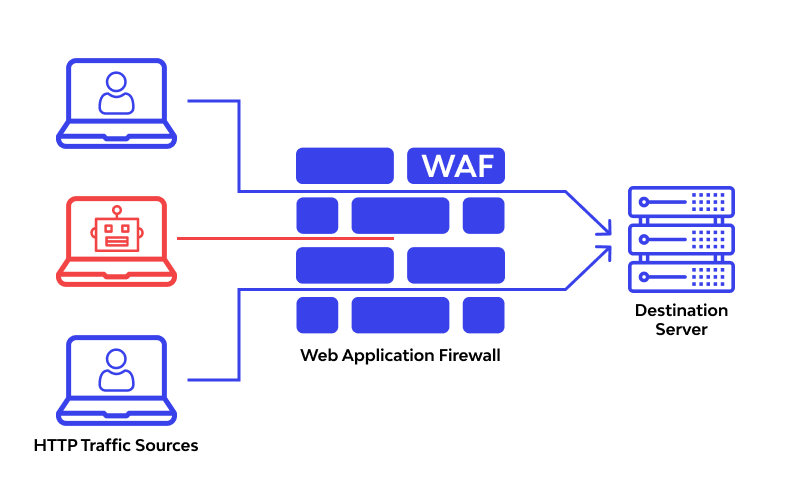
Protection with WAF.
Using a Web Application Firewall.
Another thing you can do to add extra security to your WordPress website is to use a web application firewall (WAF). A WAF is usually a cloud-based security system that provides another layer of protection around your website. It blocks all hacking attempts and filters out other malicious types of traffic, such as distributed denial-of-service (DDoS) attacks or spammers. WAFs usually require monthly subscription fees, but the addition is often worth the money.
Strengthening server security.
When choosing a hosting company, you will want one that is fast, reliable, secure, and backed by excellent customer service. This means they should have good, robust resources, maintain an uptime of at least 99.5%, and employ server-level security tactics. If a host can’t check these basic boxes, it’s not worth the time or money. One of the best things you can do to protect your website from the start is to choose the right company to host your WordPress site.
How important is security in WordPress?.
Security on a WordPress website is of utmost importance so that it can continue to function. A cyberattack can be fatal if someone else takes over the management of a page, who obviously intends to harm it. Customer information, personal data, payment cards and much more can fall into the wrong hands and potentially mean the end of a business. Maintaining a website also includes backups, which is important to have in order to return the website to a previous operational state. Securing passwords and everything mentioned are very important for protecting a WordPress website and always with the understanding that it will never be 100% safe.