Among the thousands of open source platforms available for e-commerce merchants, ZenCart and Magento are definitely stealing the spotlight as the top contenders. Each platform brings unique benefits and offerings to the table, leaving many merchants wondering which is the best option for their business.
About ZenCart vs Magento
Before exploring the features in detail, here's a quick overview of what ZenCart vs Magento promises to offer:
ZenCart: A Budget-Friendly, Customizable Solution
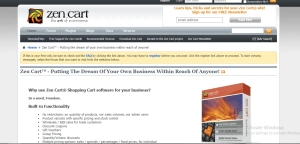
The ZenCart homepage
Launched in 2003, ZenCart is an open-source platform designed to help users create and manage their own online stores. The open-source foundation means that one can easily customize the look and feel of the store—as well as the functionality—to match their unique vision.
As of February 2025, approximately 28,000 store owners (primarily in the US and UK) use Zen Cart, although its popularity has declined due to emerging competition and a lack of modernized features.
| ZenCart Advantages | Disadvantages of ZenCart |
| + Completely free to download and install+ Highly customizable with access to source code+ Manageable running costs. works well with shared hosting+ Simple and organized interface once set up+ A large library of extensions available, most of them free+ PCI compliant | – Requires manual installation (no support for third-party tools) – Limited built-in SEO and marketing tools – Security patches are rare – No direct customer support (relies on community forums) |
Magento: A scalable, feature-rich solution

Magento/Adobe Commerce Home Page
Since its launch in 2008, Magento has quickly become a leading e-commerce platform, powering over 110,000 active online stores (primarily in the US, UK and Netherlands) today. It currently offers two different editions to meet a wide range of business needs:
- Magento Open Source (Free): Magento 2 offers complete control over every aspect of the store's design and functionality. However, the trade-off is that it requires a certain level of technical/coding expertise.
- Adobe Commerce Cloud (Paid Editions): Adobe Commerce Cloud provides a more refined, pre-configured platform than Magento 2, thanks to built-in support and a set of ready-made features. It is ideal for companies that prioritize convenience and all-inclusive solutions over customization.
| Magento Pros | Magento Cons |
| + Free to download and install + Highly customizable + Fast loading speed + Over 4,000 extensions + Built-in SEO tools and marketing features + Frequent security updates + Strong community support with extensive documentation + Manage multiple stores on one domain | – Steep learning curve for installation – High system requirements (minimum 2 GB RAM, 8 GB recommended) – Requires high-performance hosting (VPS, cloud, or dedicated servers) – Only 11 official store themes are available- Only 2 built-in payment gateways (PayPal and Braintree) |
Why does Magento have the competitive advantage?;
As you can see, both ZenCart and Magento provide open-source, PHP-based solutions that give store owners complete control over their ecommerce sites. However, Magento’s modern features, scalability, and stronger community support have made it the preferred choice for many merchants.
ZenCart vs Magento Pricing: ZenCart is More Affordable
Keeping the business within budget should always be among the top priorities, especially for small shops and startups looking to grow.
ZenCart Pricing
As highlighted, the open source nature of ZenCart means it is completely free to download and install. But once you are set up, there will be a number of ongoing costs:
| Feature or Service | Expenses (average) |
| Hospitality | $2 to $35/month |
| Topic | $0 to $50 (one-time) |
| Extensions | $0 to $25/month |
| SEO | $50/month |
| Maintenance | $200/month |
| Safety | $200/year |
Depending on the selected services and features, annual costs ranging from 824 $ to 3,920 $ may be expected .
Magento Prices
Just like ZenCart, Magento Open Source is free to download and install (not surprising, given the “Open Source” in its name). But aside from the zero-cost software, running a Magento store still comes with its own set of expenses that you’ll need to consider:
| Feature or Service | Expenses (average) |
| Hospitality | $50/month |
| Topic | 200 $ (one-time) |
| Extensions | $150/month |
| SEO | $50/month |
| Maintenance | $180/month |
| Safety | $225/year |
Taking all things into account, the annual cost of running a Magento store can reach approximately 5.585$.
Both ZenCart and Magento are free to install. However, with significantly lower ongoing costs, ZenCart comes out victorious in this battle between ZenCart and Magento.
Ease of use: Draw
Another key factor that cannot be ignored is the ease of use of the platform.
ZenCart ease of use
The ZenCart installation process can be simplified by reliable third-party applications such as Softaculous or Installatron. However, for unknown reasons, ZenCart specifically advises users against using these tools in its official documentation. As a result, there is only one path left – manual installation, which can be quite a challenge for those unfamiliar with command lines or server settings.
But here's the great news: ZenCart is redeemed with an extremely simple and organized interface once the initial setup is complete!
ZenCart displays clean drop-down menus.
Its layout is quite intuitive, with a tab bar at the top of the dashboard featuring clean drop-down menus. What’s more, each menu displays all the important features of the category in one go, meaning users can see everything at once without having to navigate through multiple screens.
Magento: ease of use
Overall, installing Magento can be quite manageable, but it does come with a learning curve. You will need to configure your web server, followed by an 11-step process for setting up import files.
Fortunately, the real reward comes once it’s installed: The Magento dashboard is a dream to navigate. All the important categories and groups are neatly placed in the left-hand menu, allowing the user to navigate through each section and tweak settings with ease.
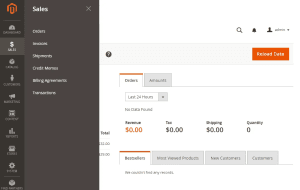
Magento has a very clean and easy-to-follow interface
Both ZenCart and Magento offer easy-to-use interfaces, although their installation processes still require time and effort..
Hosting, Performance, and System Requirements: Magento Offers Better Performance
Needless to say, a slow loading page with frequent downtime is obviously disastrous! That's why hosting and performance are considered the determining factors between the success or failure of a website.
ZenCart Hosting and Performance
Designed for simplicity, ZenCart runs efficiently on a traditional LAMP (Linux, Apache, MySQL, PHP) stack. It supports PHP 7.3 or higher and MySQL 5.7+, making it compatible with most budget-friendly shared hosting services. This makes ZenCart a cost-effective option for small businesses with limited traffic and simple product catalogs.
As an open source platform, ZenCart requires the user to choose their own hosting provider. The good news is that it is compatible with many of the industry’s top hosts, such as Bluehost and Hostinger.
ZenCart itself recommends AEIIA, Digital Ocean, and NodePing, all under 50 $ per month.
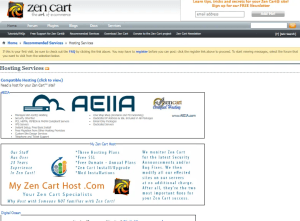
ZenCart recommends AEIIA, Digital Ocean, and NodePing as hosting providers.
In terms of speed, ZenCart holds up well, but it doesn't deliver spectacular results. Tests revealed that ZenCart sites took 1-3 seconds to load, which is marginal compared to Google's gold standard of under 2 seconds.
Magento hosting and performance
Designed for scalability, Magento requires a more robust hosting setup. It supports LAMP and LEMP (Linux, Apache/Nginx, MySQL/MariaDB, PHP) stacks and requires PHP 7.4+ and MySQL 5.7+/MariaDB 10.4+. For optimal performance, Magento benefits from advanced caching technologies like Varnish and Redis, as well as high-performance SSD hosting.
Like ZenCart, Magento requires you to choose your own hosting provider, although this isn't exactly a disadvantage as it's easy to find reliable options. Hostinger, Cloudways, Bluehost, and Fixit.gr, for example, are recognized for their strong uptime and security!
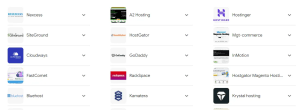
Magento works well with many leading providers
Speed is another area where Magento really excels: in tests, it only took around 0.6 seconds (sometimes less) to load. This number far exceeds Google’s recommended speed and also puts Magento ahead of ZenCart.
Finding a reliable hosting provider for both ZenCart and Magento is simple, even for beginners. But when it comes to performance, Magento's lightning-fast loading speed easily makes it the champion in this round.
Adjustment: Draw
As website creation becomes more and more common, the big question is: how much can one improve a website to the point of setting it apart from others?;
ZenCart Customization
ZenCart offers a variety of themes developed by third-party designers, although the exact number of themes available may vary depending on the source. Many themes are scattered across different marketplaces, such as TemplateMonster, and include both free and premium options.
Simple adjustments can be made for these using existing settings, such as:
- Changing the width of the side boxes
- Remove the search box from the header
- Modify the way categories, purchase buttons, and product statuses are displayed.
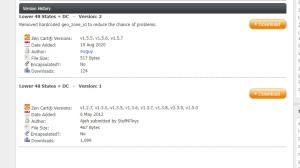
There are 23 ZenCart themes available for download
However, any customization requirements beyond these require adding custom code or overrides. Even something as simple as changing colors and fonts involves additional style sheets that are manually edited in word processing programs! While this gives users incredible control over the design of their websites, those without coding experience will likely find it quite daunting.
Magento Customization
Like ZenCart and basically all other open source platforms, Magento allows for customization of every aspect of the look and feel of the store.
But with great power comes (a lot of) complexity! Sure, you can change the default theme color using built-in settings, but anything else requires custom coding and style sheets. And with only 11 official themes to choose from, the limited preset options will likely make things even more daunting for beginners.
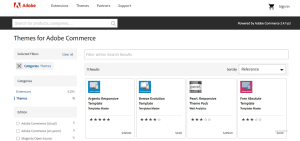
Magento only has 11 themes
There are thousands of Magento themes customized for non-tech-savvy users, but the claim of these unofficial themes as an «advantage» over ZenCart seems quite misleading. Therefore, we have a tie in this round, as both OpenCart and Magento offer a similar high level of customization for advanced users.
Ecommerce Features: Magento is More Comprehensive
At the end of the day, the success of an e-commerce store depends on its e-commerce capabilities.
Inventory management
Like other store features, ZenCart aims to give users the freedom to customize their inventory management.
But in case someone isn't ready, the built-in inventory management tools are fortunately more than enough to cover any need. Go to "Admin" > "Configuration" > "Inventory" and then use the available configuration tools to keep your inventory running smoothly:
| Key | Description |
| STOCK_CHECK | Verify if there is enough stock available. |
| STOCK_LIMITED | Reduction of inventory levels based on product orders. |
| STOCK_ALLOW_CHECKOUT | Option for customers to complete checkout even with insufficient inventory. |
| STOCK_MARK_PRODUCT_OUT_OF_STOCK | It visually indicates which products are out of stock for customers. |
| STOCK_REORDER_LEVEL | Setting the threshold for when inventory should be replenished. |
| SHOW_PRODUCT_SOLD | Checking product visibility when out of stock: + 0 = Set product status to OFF + 1 = Keep product status ON. |
| DISABLED_PRODUCTS_TRIGGER_HTTP200 | Determining how search engines treat disabled products: + True = Return HTTP 200 response + False = Return HTTP 410 (Deleting will return HTTP 404) + Default: false. |
| SHOW_PRODUCTS_SOLD_OUT_IMAGE | Replace the Add to Cart button with a Sold Out image. + 0 = disabled + 1 = active. |
| ENABLE_DISABLED_UPCOMING_PRODUCT | Determine how deactivated products with a future availability date are activated when the date arrives. |
| QUANTITY_DECIMALS | The decimal digits specification for the quantity. (0 = off). |
Similarly, one can be impressed by Magento's powerful inventory management capabilities. Of course, there is the option to fully customize the backend, but the default settings alone are more than enough to create an effective inventory management system:
| Composition | Description |
| “Inventory reduction when placing an order” | It reduces the inventory quantity when a customer places an order. |
| 'Item Definition' status to be in stock when order is cancelled'‘ | Automatically returns items from canceled orders to inventory. |
| ‘'Show out-of-stock products'’ | Ability to show or hide products that are currently unavailable on the store's website. |
| “Only X left threshold” | Sets a notification threshold to notify customers when inventory is low. |
| ‘'Stock Management'’ | Enables or disables inventory management for each specific product. |
| ‘'Monitoring'’ | Allows customers to place orders for products that are currently out of stock. |
| ‘'Maximum quantity allowed in shopping cart'’ | Configuring the maximum number of units a customer can add to their shopping cart. |
| «"Out of stock limit"» | Sets the threshold price that will be displayed when a product is out of stock. |
| ‘'Minimum quantity allowed in shopping cart'’ | Defines the minimum number of items required for a customer to place an order. |
| ‘'Customer groups'’ | Allows setting minimum quantity rules for different customer groups. |
| ‘'Automatically return credit memo item to inventory'’ | Automatically returns products that have been returned to inventory after processing a credit memo. |
Payment
For built-in offline methods, ZenCart currently offers two options:
- Check/Money Order: This option places the responsibility on the buyers. They must first send their payments. The order status can be set to “Pending” and kept that way until the check or money order arrives.
- Cash on delivery (Cash on delivery): Unlike a check/money order, the cash on delivery option means customers only pay when they receive their order through physical delivery, making it ideal for businesses that deal with local customers.
For online gateways, there are around 200+ options available, covering many popular gateways such as PayPal, Stripe, Zelle, Braintree and more.
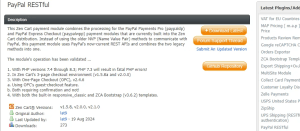
In 2025, ZenCart received updates to integrate PayPal RESTful, improving payment processing capabilities in ZenCart.
Meanwhile, Magento offers some built-in payment gateways (though not many – only PayPal and Braintree).
Fortunately, like ZenCart, extending payment methods is a breeze thanks to Magento Connect and the additional features. extensions. In fact, the platform features an astonishing 607 payment-related extensions (ranging from $0 to $799) to offer endless customization possibilities! 402 of the 607 extensions are dedicated solely to payment integrations, while the rest aim to improve the checkout experience and prevent fraud.
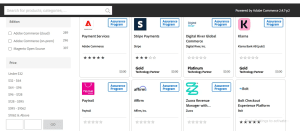
Magento has 607 payments-related extensions
Shipping settings
With its available built-in options, ZenCart allows for the following:
- Create a shipping zone: This option allows specific shipping rules to be applied to targeted regions.
- Define shipping dimensions: ZenCart allows precise dimensions for the product (length, width, height, or weight) to be entered for accurate shipping calculations for each order.
- Free shipping definition: Want free shipping on orders over a certain amount? Conditions can be easily set up that trigger free shipping whenever these criteria are met.
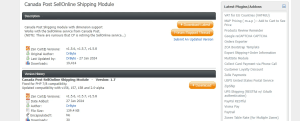
To go beyond these basics, you will need to use SQL commands to modify the settings. Or, for an easier approach, consider choosing one of ZenCart’s 60+ shipping modules available. The best part is that they can be programmed to automatically disable themselves when requirements are not met. For example, if a module is intended for US orders, it will be disabled when handling international orders from places like the UK or France.+
Time for Magento. It’s impressive that its built-in shipping settings already give users strong control over their shipping process. Without the need for additional extensions, the following can be customized for your store’s needs:
- Flat rate shipping : This feature allows a fixed shipping rate to be charged per item, whether small accessories or large products, to simplify costs.
- Shipping Policy: These settings help define clear shipping guidelines (e.g., offer free shipping for orders over a certain amount.)
- Point of origin : Here, it can be determined where orders are shipped from and tax rates can be automatically calculated based on the information to ensure accurate pricing.
- Multiple addresses : With this option, customers can send items to different addresses with one order (for gifting purposes, for example).
- Free shipping: Free shipping can be set to activate whenever certain conditions are met. As a result, customers will feel more inclined to place large orders to unlock free delivery.
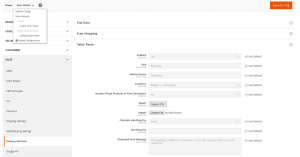
Magento's shipping settings are quite comprehensive
Multi-vendor functionality
It's quite disappointing that ZenCart still lacks this feature. It's possible to integrate the store via a module or plugin, but even that proves difficult!
Some merchants have had some success using multi-location modules, but they fall short when it comes to tracking orders and effectively monitoring the performance of individual suppliers.
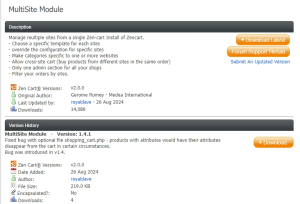
ZenCart's multi-site modules are not sufficient for creating a multi-vendor plan.
On the other hand, Magento performs much better in this regard. While there are no built-in multi-vendor features yet, Magento offers 8 extensions with custom features and dashboards for each vendor.
Even better, they come with multilingual support to allow each supplier/branch to be assigned to a specific country or region.
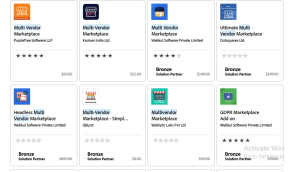
Magento offers extensions from many vendors.
It's a tough battle between ZenCart and Magento, as both platforms offer similar performance in many areas. However, Magento ultimately took the lead with its wider range of payment options and multi-vendor capabilities.
Extensions: Magento has more options
In previous sections, we briefly touched on how ZenCart vs. Magento 2 rely on extensions to fill in some gaps in their built-in functionality. However, the full range of what both platforms offer has yet to be explored.
ZenCart Extensions
Currently, ZenCart features over 2,200 extensions organized into 15 main categories (with a bonus “Other” category for anything that doesn’t fit anywhere else). The best part is that most of them are completely free, meaning you have complete control over your store’s complex settings without spending a dime.
ZenCart offers the following search filters:
- Name: Allow alphabetical sorting
- Date added : Show the newest extensions added to the collection
- Total downloads: Show which extensions are downloaded the most
- Last downloaded: What extensions have been downloaded recently?
- Author/Uploader: Track all extensions uploaded/created by a specific developer or community
- Rating: Sort by top-rated extensions (with the highest ratings and user scores)
Once an extension is clicked on, the full update schedule can be accessed – sometimes down to the specific details of each update. This helps further confirm whether the extension is actively supported and aligns with current business goals.
Magento Extensions
Magento features a huge collection of over 4,200 extensions, ranging from completely free to around 900 $ per year.
Navigating this collection is also very easy, thanks to the platform's smart filtering systems. In addition to the basics (Relevance, Price, and Rating), Magento offers the following filters:
- Secured extensions: This label means that these extensions have been thoroughly tested and verified by trusted programs.
- Issue: The perfect application for the current version of Magento (either Magento Open Source or the paid versions) can be quickly found.
- Partner type : For added reliability, look for extensions developed by Adobe Gold or Platinum partners.
There is a Q&A section for each extension.
Both ZenCart and Magento provide an extensive collection that covers a variety of needs. However, Magento's library is almost twice the size of ZenCart's library, and many of its extensions are rigorously quality-tested. With that in mind, Magento is the winner in this round.
SEO & Marketing Features: Magento Prevails
With the store setup, settings perfected, and the right extensions added, you're ready to tackle the most critical challenge: showcasing your products! ZenCart vs. Magento take slightly different paths to accomplish this.
ZenCart SEO & Marketing Features
When it comes to SEO (search engine optimization), ZenCart provides a basic SEO guide for keyword optimization, alt text, and meta tags. However, it doesn’t offer any built-in tools to streamline such processes. One has to use custom coding or third-party plugins to perform more advanced practices.
So far, there are about 30 free SEO-related plugins. Since there is no dedicated SEO category, you will need to enter relevant keywords (e.g. “SEO”) in the search bar.
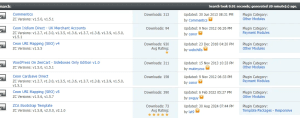
ZenCart isn’t exactly impressive when it comes to built-in marketing tools. There’s only a simple email system that allows for:
- Bulk email sending to multiple addresses
- Add custom messages to checkout confirmations
- Send personalized order updates
Beyond that, you will once again have to rely on plugins or custom solutions for more sophisticated marketing strategies. ZenCart currently offers 136 free plugins that provide various tools for discounts, surveys, social media integration, automatic tweets for new product releases, etc.
Magento SEO & Marketing Features
For SEO beginners, Magento makes it very easy to get started with basic tools at your fingertips. From the dashboard:
- Customizing title tag prefixes and suffixes
- Configuring meta tags for both product pages and homepages
- Setting up SEO-friendly URLs for products and categories
- Image optimization with alternative text for both graphics and logos
- Manage canonical tags to avoid duplicate content.
One can also connect the store to Google Adwords and Google Analytics to gain access to a complete picture of the store’s traffic, conversions and SEO campaign success. Furthermore, with nearly 400 SEO extensions available (from 0 $ to 399 $ per year), they offer beyond the basics to gain full control over search rankings.
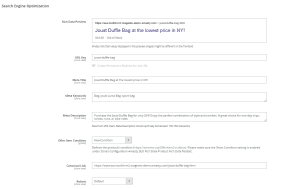
Magento has excellent, comprehensive SEO settings.
On the marketing side, Magento's built-in tools allow for the creation of highly effective campaigns and product offers that target a wide range of audiences. Key features include:
- Coupons: Personalized discounts and exclusive offers aimed at loyal customers or specific segments.
- Related products : With just a few clicks, Magento automatically recommends complementary products to customers to boost the chances of cross-selling and upselling.
- Wish lists : This feature allows customers to save their favorite products for later, keeping them engaged and encouraging repeat visits.
- Product Reviews: It offers customers a platform to share their positive experiences, which helps build social proof and influences new shoppers to choose the store.
Additionally, Magento offers over 543 marketing extensions (ten times more than ZenCart) ranging from $0 to $1200 per year.
Overall, ZenCart leans heavily towards the tech-savvy crowd. Magento, on the other hand, offers something for everyone – both experienced coders and beginners who rely on built-in tools and plugins. This flexibility is exactly why Magento continues to win against ZenCart in this round as well.
Integration capabilities: Magento is more flexible
Beyond the main features, one needs to see how effortlessly ZenCart vs. Magento connects with other tools or systems.
ZenCart Integration
Unlike many of its competitors, ZenCart doesn’t have a built-in API or an easy way to directly integrate with external platforms or tools. This means that if you want to connect ZenCart with CRM systems, accounting software, or other tools, you’ll have to get creative. Some common options include:
- Installing ZenCart plugins and modules (quick fix for common integrations)
- Custom API development (requires coding skills and some technical know-how)
- Using third-party services such as API2Cart.
Magento integration
In contrast, Magento really stands out in this criterion, thanks to its strong API support.
Whether SOAP (Simple Object Access Protocol) or REST (Representational State Transfer), it is not limited to default options! Instead, there is the freedom to customize every aspect of the business and seamlessly integrate third-party tools, such as CRM and ERP.
While ZenCart can still handle integrations with the help of third-party tools, it doesn't have the seamless API support that Magento offers out of the box. Therefore, Magento clearly takes the lead here.
Security: Magento releases more frequent updates
With e-commerce merchants constantly under threat from hacking and data breaches, security has become more critical than ever.
ZenCart Security
Overall, the platform strictly complies with PCI (Payment Card Information) standards to ensure that cardholder data is always handled with care. Even better, while many platforms focus on just patching the core system, ZenCart goes a step further by offering security fixes and patches for plugins as well.
However, here is the other side of the coin: ZenCart patch releases are quite few. The last patch was released in November 2024, but before that, users had been waiting since 2020. That's four years without any major updates!
Magento Security
Like ZenCart, Magento also complies with PCI standards to protect sensitive payment information and give merchants peace of mind.
Additional, the platform is always on the lookout for new updates, with security patches released every 2 to 6 months (much more often than ZenCart). As a result, the store's defenses are strengthened and vulnerabilities are addressed before any damage is caused.
Recently, Magento 2.4.8 was announced with a focus on advanced security features, such as improved two-factor authentication (2FA) and improved CAPTCHA to protect against automated attacks. Other key features include:
- Optimized query processing for faster loading times.
- Asynchronous API improvements to efficiently handle large data loads.
- Advanced marketing tools for personalized offers and SEO improvements.
For more details on security updates, one can refer to the Magento Security Center. It provides a constant stream of critical reports to keep users informed: new security patches, current issues (if any) and their severity, which versions are at risk, and more.
Both ZenCart and Magento are PCI compliant. However, when it comes to ongoing protection, Magento is the clear winner with its much more frequent security updates.
Customer Support: Magento has more resources
Last but not least, strong customer support is very important for open source platforms like ZenCart vs Magento. Otherwise, users will easily get lost in the countless customization options.
ZenCart Customer Support
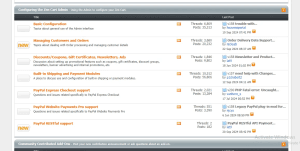
All ZenCart offers is official documentation and a community forum where users help each other – far from ideal if you need quick answers or expert help.
Magento Customer Support
Like ZenCart, Magento offers a robust and well-structured knowledge base filled with comprehensive guides to help with every stage of store management. The community forum is also lively and responsive!
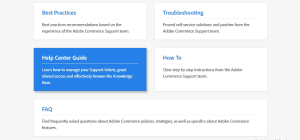
Magento has a very well-structured knowledge base.
However, where Magento really shines is its live support options. You can get real, personalized human help by calling 1-800-685-3624 or emailing [email protected].
Magento not only provides a wealth of help resources, but also gives users access to instant, personalized support. This human touch is what ZenCart still falls short of, making Magento the winner once again.
Final Words
The comparison ZenCart vs. Magento offered a solid understanding of their capabilities. While ZenCart is still a strong competitor, Magento clearly outperforms in many key areas!
So, if someone wants to take their business to new heights, now is the time to do it with the Fixit Magento migration . With many years of experience and many successful migrations, Fixit's experienced developers are committed to making the transition smooth, stress-free, and with the team's support every step of the way.