Is Magento a secure platform?;
The Magento 2 makes it easy to set up an e-commerce store and sell globally. But this ease of use comes at a cost. Store owners are not experts and professionals and don’t always know how to protect a Magento site from security risks and cyberattacks. A security breach can lead to devastating results and permanent reputation loss. A 2021 report from the Ponemon Institute found that the average cost of a data breach is over $4 million worldwide.
Why is security so important in Magento?.
E-commerce sites are a favorite target for hackers. In most cases, before anything can be purchased online, an account must be registered and some personal information must be provided. There is already an incentive for cybercriminals to steal this data and use it for all sorts of fraudulent activities. Most online purchases also involve entering credit card details (another thing hackers are interested in). Some online store owners skip the hassle of securing credit card data and opt to have a payment processor handle the transactions. But that alone isn’t enough. With the right level of access, hackers can steal valuable billing information by creating fake pages that mimic the payment processor’s interface. In the worst case, the consequences for customers are huge, but they are even more devastating for the store owner. The damage to the brand and website reputation is often irreparable.
How can a Magento website be secured?.
The Magento platform is extremely secure, but no platform offers 100% protection from cyberattacks. For the 2/3 of Magento merchants still using the outdated Magento 1 platform (which reached end of life in June 2020), securing your business should start with an upgrade to Magento 2. This is critical, as without this transition, merchants are exposed to security risks on unsupported software.
Some key safety data to note:
Migrating from Magento 1 to Magento 2 is crucial for website security.
- PCI-DSS (Payment Card Industry Data Security Standard) compliance
- Change default administrator username
- Change admin URL
- Using two-step verification for Magento admin login
- Using the IP whitelist for Magento admin
- Set a strong password for policy and criteria
- Login attempt scoring limit for Magento administrator
- Enabling CAPTCHA for login, account registration, and contact forms
- Setting recommended file and directory permissions
- Defining recommended administrator roles and permissions
- Update the security code from a trusted source, such as the Adobe marketplace
- Securing the server with a web application firewall (WAF)
What cyberattack threats can a Magento website face?;
Let’s take the third security detail on the list above, the admin URL, and how critical it is to Magento security. By default, a Magento site URL is /admin, and for a cybercriminal, it can become a tool to hack into a site. The only way to truly protect the admin is to use IP protection or, even better, multi-factor authentication (MFA). Neglecting this vital measure exposes the site to Google Dorking, a technique widely used to find security vulnerabilities by exploiting Google’s advanced search functionality. A very simple search can return thousands of login pages to the admin sites of anyone running Magento version 1, with the URL /admin, in less than a second.
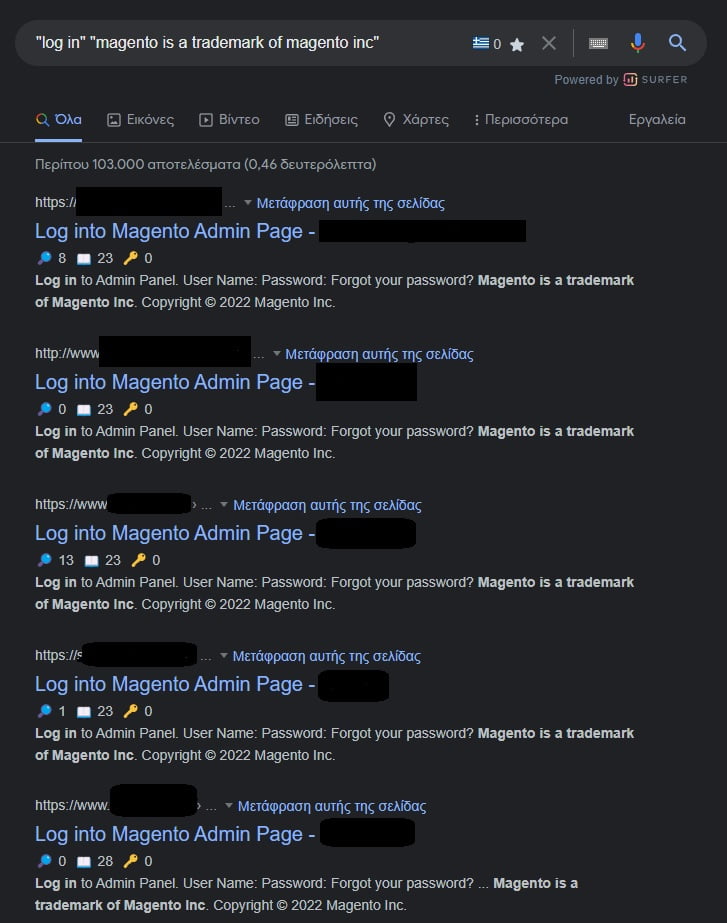
It's scary how easily someone can attempt to log in to a website as an administrator.
A bot will then be used to run a credentialing application, with thousands of username and password combinations on the login page, until it finds a successful match and takes over the account. The attacker has now gained access to the website, which contains a huge amount of data related to both the business and its customers.
Magento's security core.
Magento is owned by Adobe (a company that can’t afford to ignore security and actually invests in it). There is a dedicated security team that validates all Magento-related products against the Open Web Application Security Project (OWASP) standards. The team regularly scans the entire code base and issues patches whenever a vulnerability is discovered. Adobe employees aren’t the only ones finding security holes in Magento 2, however.
A generous bug bounty program encourages independent security researchers to help identify and fix vulnerabilities. Overall, a lot of effort is being put into ensuring that one of the world’s most popular e-commerce applications is as secure as possible. Does this mean that a website owner can rest easy? The answer is, No. The online store owner has a responsibility to keep the website and user data well protected. Choosing a Magento certified professional gives additional security to the work of online store owners.
Other security measures.
There are some ways that are not generally mentioned, but if implemented, they will certainly help protect stores from hackers.
- Secure your computer. If the computer used to manage your Magento 2 store does not have a secure password, it would be extremely easy for hackers to crack the operating system and cause damage to the computer and your Magento store as well. Make sure that there is a password on the computer, good antivirus software, and that a firewall is enabled to protect the computer.
- Use SFTP. It would be better to use Secure File Transfer Protocol rather than just File Transfer Protocol. SFTP encrypts data and commands to prevent passwords and other sensitive information from being exposed to attackers.
- Email Security. Email is always connected to the internet. If a store owner has set a weak password without two-factor authentication, the chances of it being compromised increase tremendously. If a hacker manages to find the password of the store’s official email address, he can commit cybercrime. Therefore, email security is also one of the small but important steps to increase the store’s security.
Magento security extensions.
The above mentioned precautions are not the only steps that can be taken to secure a Magento website. They will only work if combined with other best practices, such as using unique and strong passwords and installing an SSL certificate to encrypt user data. Of course, many may turn to third-party extensions when enhancing the security of their Magento 2 websites. So instead of doing all these individual actions, the security issue can be eased. This is indeed a good prospect, but placing too many extensions on a Magento 2 website could lead to unwanted side effects.
Epilogue.
An e-commerce website owner faces several security challenges. He is responsible for storing a lot of sensitive personal and billing data, which immediately makes him a more attractive target for cybercriminals. Magento 2 can help a lot in this regard, as it is at the top when it comes to e-commerce platform security. It has all the features required to create a secure online store, and third-party extensions offer additional functionality and security.